
Viora vs Siri: Mac Voice AI and Apple Dictation
Compare Viora and Siri for Mac voice AI, Apple Dictation, Writing Tools, privacy, platform availability, text editing, and best-fit workflows.
Reviewed by the Viora team. We checked the comparison against official vendor pages, pricing pages, privacy materials, and Viora product pages. We name Viora as the publisher because we make one of the products being compared.
By the Viora team · Published June 14, 2026 · Revised June 16, 2026.
Direct Answer
Choose Viora if you work mainly on a Mac and want voice to create work output. Viora can write polished text in the current app, edit selected text, answer about context, and run small agent-style tasks.
Choose Siri if you want Apple's built-in assistant for quick questions, Apple system tasks, device control, smart home actions, and supported app actions. Use Mac Dictation for basic text entry. Use Apple Writing Tools when Apple Intelligence is available and you want to proofread, rewrite, summarize, or organize selected text.
The Viora vs Siri choice is not about one tool replacing the other. It is about the job. Siri is a built-in Apple assistant. Viora is a Mac-first voice AI assistant for writing, editing, asking, and doing work inside apps.

Use this decision map for the main article promise: Viora fits Mac work output, while Siri fits Apple system tasks and quick requests.
Definition Block
Viora vs Siri: Viora is a cloud-assisted voice AI assistant for macOS that turns speech into writing, edits, answers, and small agent tasks. Siri is Apple's built-in assistant for Apple devices, system actions, quick questions, app actions, and Apple ecosystem control.
Viora vs Siri: Quick Comparison
| Dimension | Viora | Siri, Dictation, and Apple Intelligence |
|---|---|---|
| Best fit | Mac users who want voice to write, edit, ask, and do workflow tasks | Apple users who want built-in assistant tasks, system actions, and Apple ecosystem control |
| Main category | Voice AI assistant for macOS | Built-in Apple assistant and system voice features |
| Text entry | Hold a shortcut, speak, and insert polished text in the current Mac app | Mac Dictation lets users place the cursor in an app and dictate text |
| Text editing | Edit selected text with spoken instructions | Writing Tools can proofread, rewrite, adjust tone, summarize, and organize selected text when available |
| Questions | Ask about highlighted or nearby context in place | Siri can answer questions, get web information, and use Apple Intelligence where available |
| Actions | Small agent tasks such as web search, calendar lookup, and connector workflows | Apple system tasks, Apple device control, smart home actions, and supported app actions |
| Platform | macOS only today; Apple Silicon and Intel builds are listed | Built into Mac and other Apple devices; Apple Intelligence features vary by model, language, and region |
| Privacy model | Cloud-assisted; not fully offline | Siri and Dictation may be on-device or server-processed depending on settings; Apple Intelligence can use on-device processing and Private Cloud Compute |
| Pricing note | Viora public pages list Free and Pro plans | Apple public pages describe Siri as built into Mac, not as a separate SaaS plan |
Choose Viora If You Want Voice to Write, Edit, Ask, and Do
Viora is built for people who want voice to help with work in Mac apps. It is not only a question-answer assistant. It is a voice workflow layer.
Use Viora when these jobs matter:
- You want to speak into the app that already has focus.
- You want rough speech turned into cleaner writing.
- You want to edit selected text by voice.
- You want to ask about selected or nearby context.
- You want small agent tasks, such as search, calendar lookup, or connector workflows when supported.
- You want a personal dictionary for names, products, and technical terms.
Viora's voice dictation for macOS page describes a hold-to-talk loop. You hold a shortcut, speak naturally, and release to insert polished text. Viora's public pages also describe cleanup for filler words, punctuation, capitalization, restarts, and tone.
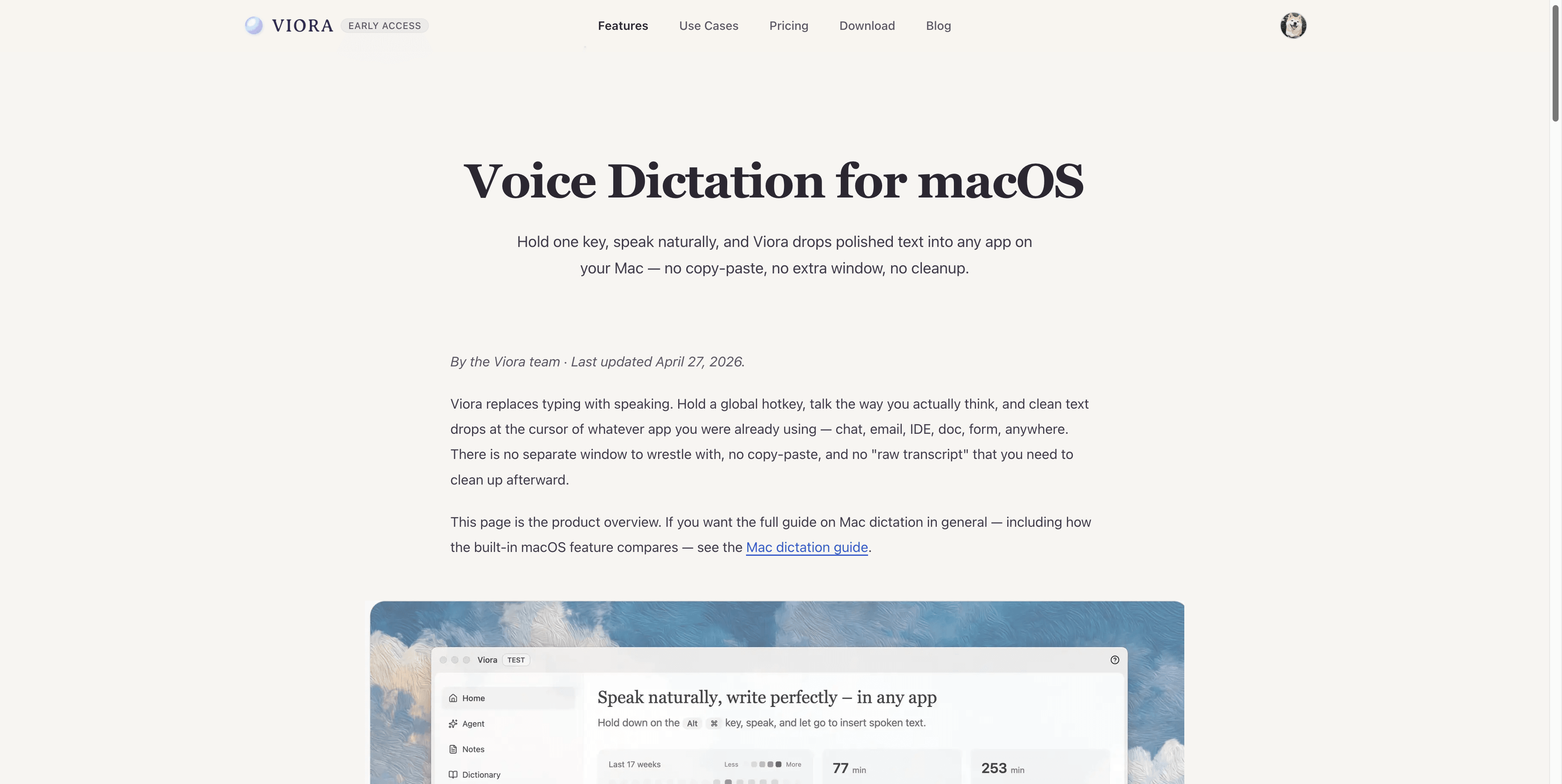
Viora's dictation page shows the article's Viora-side workflow: hold one key, speak naturally, and insert polished text into Mac apps.
This makes Viora a strong fit for daily writing work. Examples include email, docs, AI prompts, code review notes, support replies, product drafts, and handoff cleanup. These use cases are listed on the Viora use cases page.
Viora is not the right fit if you need Windows, iOS, Android, offline-only dictation, local Whisper models, BYO LLM keys, a public API, a lifetime license, or a HIPAA-ready tool today.
Choose Siri If You Want the Built-In Apple Assistant
Siri is built into Mac. Apple says you can use Siri with voice or typed requests after Siri is turned on. Apple lists common Siri jobs on Mac, including getting information, calling, texting, emailing, playing music, controlling Apple devices, controlling smart home accessories, and using Siri with apps.
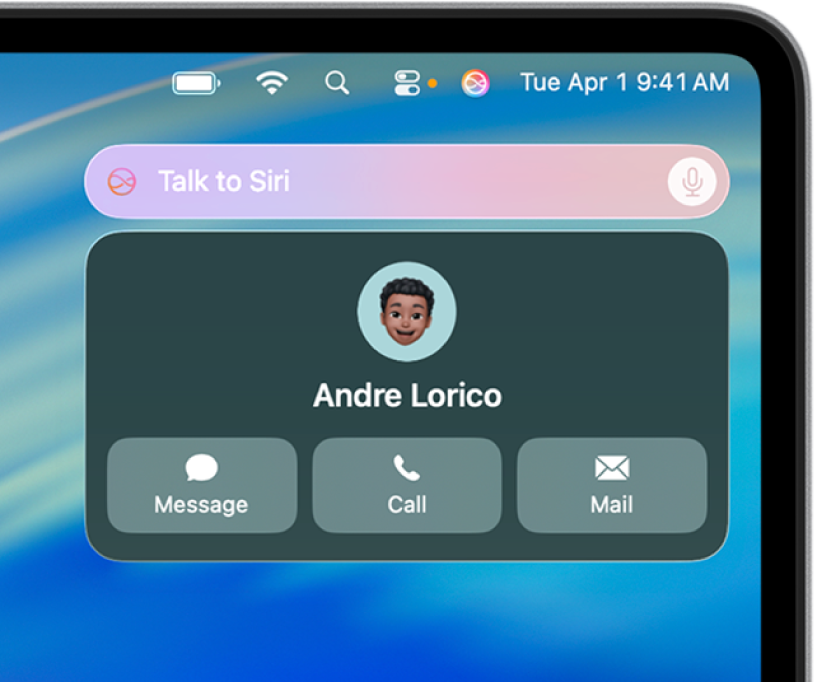
Apple's Mac User Guide visual shows Siri as an Apple assistant for quick requests and system actions. Downloaded from Apple Support on June 14, 2026.
Use Siri when these jobs matter:
- You want to ask a quick question.
- You want to control Apple devices or smart home accessories.
- You want to call, text, email, or play media by voice.
- You want Apple system-level assistant behavior.
- You want supported app actions through Apple's Siri and Apple Intelligence layer.
Siri is the better default for Apple ecosystem tasks. If your request is "start a timer," "text this person," "play this song," "turn on the lights," or "what can you do," Siri is the natural place to start.
Siri is not the same job as Viora. Siri can help with many Apple tasks. Viora is more focused on turning speech into polished work inside Mac apps.
Where Apple Dictation and Writing Tools Fit
Apple has more than one voice or writing feature. This matters because "Siri" and "dictation" are not the same thing.
Mac Dictation is for text entry. Apple's Mac Dictation guide says users can place the cursor in an app, press the Microphone key or a Dictation shortcut, and dictate text. It also says the Microphone key can start Dictation, while pressing and holding it can activate Siri when Siri is enabled.
Apple Dictation can add some punctuation automatically in supported languages. Users can also customize the Dictation shortcut and set dictation languages. Apple says Dictation is not available in all languages or regions, and features may vary.
Apple Writing Tools are different again. With Apple Intelligence, Writing Tools can proofread, rewrite, change tone, summarize, and organize selected text. Apple says Writing Tools work in many places where you write, including third-party apps and websites. Apple also says Apple Intelligence is not available on all Mac models, languages, or regions.
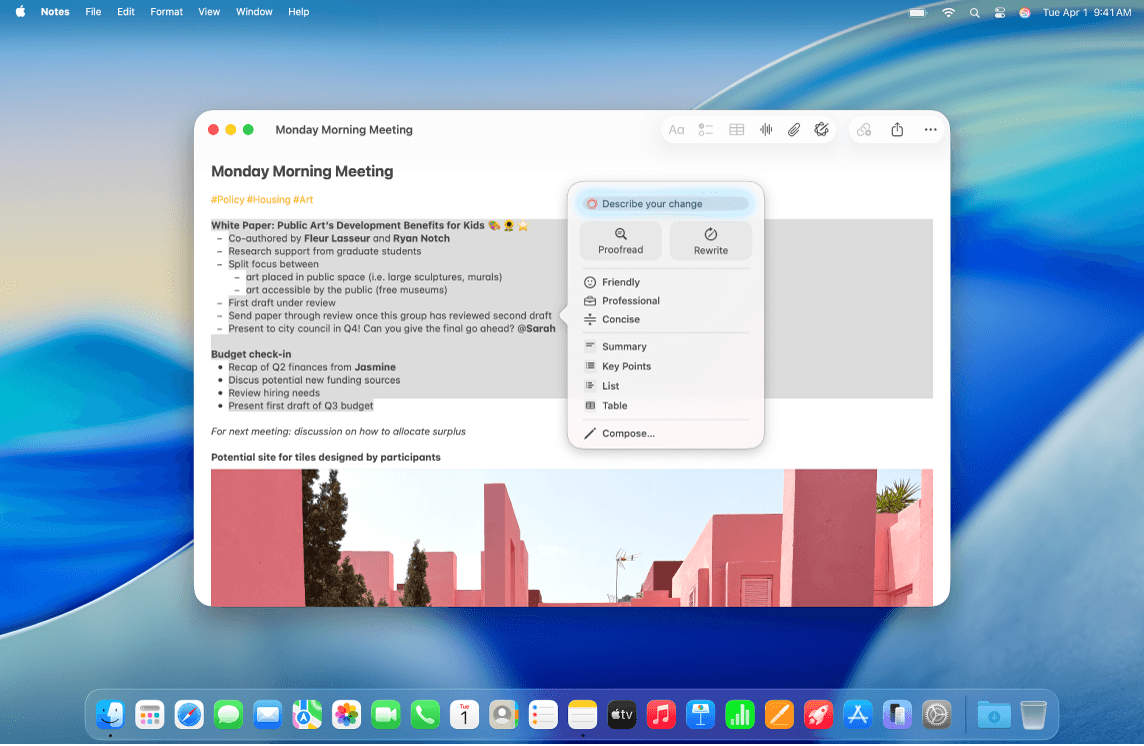
Apple's Writing Tools visual supports the article's point that Apple's text editing path is Writing Tools, not Siri alone. Downloaded from Apple Support on June 14, 2026.
So the practical map is simple:
| Job | Start with |
|---|---|
| Quick Apple assistant task | Siri |
| Basic text entry | Mac Dictation |
| Proofread, rewrite, summarize, or organize selected text | Apple Writing Tools, if available |
| Speak, clean up, edit, ask, and route small tasks in one Mac workflow | Viora |
Feature Comparison
| Feature area | Viora | Siri, Dictation, and Apple Intelligence |
|---|---|---|
| Built-in status | Third-party Mac app | Built into Apple systems |
| Voice trigger | Global hold-to-talk shortcut | Siri activation and Dictation shortcuts depend on Apple settings |
| Current app writing | Public Viora pages describe writing into the focused app or text field | Mac Dictation supports dictating text after placing the cursor in an app |
| Cleanup | Viora public pages describe cleanup for filler words, punctuation, capitalization, restarts, and tone | Dictation can add some punctuation in supported languages; Writing Tools can rewrite and adjust tone |
| Selected text edits | Viora supports selected-text editing by voice | Writing Tools can rewrite selected text where Apple Intelligence is available |
| Context questions | Viora can answer about selected or nearby context | Siri can answer questions and Apple Intelligence can add more Siri behavior where available |
| Agent tasks | Viora public pages describe small agent-style tasks such as web search, calendar lookup, and connector workflows | Siri can complete Apple system and supported app actions |
| Personal terms | Viora lists personal dictionary support | Apple Dictation language and Siri behavior depend on Apple settings and available features |
| Best limitation to know | Viora is cloud-assisted and macOS-only today | Apple Intelligence and some Siri features vary by model, language, region, and OS support |
Privacy and Processing Notes
Do not choose by a vague privacy claim. Read the exact policies.
Viora is cloud-assisted. Viora's Viora Privacy Policy says audio, text, and relevant context may be sent to Viora backend systems when needed. It also says Desktop task content can use Fireworks AI for large-model processing. Viora says it does not sell user data and does not use voice or text to train models. Viora Privacy Mode can reduce persistence for supported new tasks, but it does not make transcription fully local.
Apple's Siri, Dictation, and Apple Intelligence privacy model is different. Apple says Siri Settings and Keyboard Settings can indicate whether Siri or Dictation audio is processed on device and not sent to Apple servers. Otherwise, audio is sent to Apple servers for processing. Apple says audio data is not stored unless the user opts in to Improve Siri and Dictation. Apple also says related request data and transcripts may be stored with a rotating random device identifier.
Apple Intelligence adds another layer. Apple says Apple Intelligence centers on on-device processing. For more complex requests, it can use Private Cloud Compute. Apple says Private Cloud Compute uses Apple silicon servers, processes relevant data, and does not store that data. Apple also says Apple Intelligence features and generative outputs vary, and important information should be checked.
For regulated or sensitive work, do not assume either product is ready for your policy. Viora does not claim HIPAA, SOC 2, or ISO 27001 today. Apple feature availability and processing details can depend on settings, device, region, and feature.
Platform, Price, and Availability
Viora is macOS-only today. Its public pages list Apple Silicon and Intel Mac builds. Viora public pages list Free and Pro plans, and Viora pricing should be checked before buying because plan details can change.
Siri is built into Mac and other Apple devices. The checked Apple sources do not present Siri as a standalone SaaS plan. Apple Intelligence features, including newer Siri and Writing Tools behavior, are not available on every Mac, language, or region. Apple also lists OS, storage, language, and device requirements for Apple Intelligence.
Use this as the purchase rule:
- If you already have an Apple device and need system assistant tasks, try Siri first.
- If you need simple built-in dictation, try Mac Dictation first.
- If you need Apple text editing and your Mac supports Apple Intelligence, try Writing Tools.
- If you need a Mac voice workflow for writing, editing, asking, and small tasks, try download Viora for Mac.
Which One Should You Choose?
Choose Viora if your work starts in a text field, document, chat app, code editor, support tool, or AI prompt box. Viora is designed for the moment when you want to speak the work, not just ask a question.
Choose Siri if your work starts with Apple system control. Siri is the natural choice for device actions, media, quick questions, smart home control, calls, texts, email actions, and supported Apple app actions.
Choose Apple Dictation if you only need basic speech-to-text. Choose Apple Writing Tools if you need built-in Apple text editing and your device supports Apple Intelligence.
For more context on built-in dictation and third-party Mac voice tools, read the Mac dictation guide. For other tool comparisons, see Viora resources.
Entity Profile
| Field | Viora | Siri |
|---|---|---|
| Entity name | Viora | Siri |
| Entity type | Software application | Built-in Apple assistant |
| Owner | Viora | Apple |
| Category | Voice AI assistant for macOS | Apple assistant and system voice interface |
| Main workflows | Write, edit, ask, and do from voice | Quick questions, Apple system tasks, Apple device control, smart home control, and supported app actions |
| Text entry relation | Direct Viora workflow | Mac Dictation is Apple's built-in text-entry feature |
| Text editing relation | Spoken selected-text editing | Writing Tools can rewrite and summarize selected text where Apple Intelligence is available |
| Platform | macOS; Apple Silicon and Intel builds are listed | Mac and other Apple devices; newer Apple Intelligence features vary by device and region |
| Processing model | Cloud-assisted; not fully offline | On-device and server processing can vary by Siri, Dictation, Apple Intelligence, settings, and request type |
| Important limitation | No Windows, iOS, Android, HIPAA, public API, BYO LLM key, local Whisper model, or lifetime license today | Siri and Apple Intelligence availability and features vary by model, language, region, and OS support |
| Related Viora pages | Viora, voice dictation for macOS, Viora pricing | Apple official pages checked June 14, 2026 |
FAQ
Is Viora a Siri alternative for Mac?
Yes, Viora can be a Siri alternative for Mac users who want voice to write, edit, ask, and run small workflow tasks in apps. It is not a full Apple system assistant replacement. Siri remains the natural tool for Apple system actions and device control.
What is the main difference between Viora and Siri?
Viora is a Mac voice AI assistant for work output. It focuses on writing, selected-text edits, context questions, and small agent tasks. Siri is Apple's built-in assistant for quick questions, Apple system tasks, device control, smart home control, and supported app actions.
Should I use Viora or Siri for writing on Mac?
Use Viora if you want to speak rough thoughts and insert polished text into the current Mac app. Use Mac Dictation if you need basic built-in speech-to-text. Use Apple Writing Tools if you want built-in proofreading, rewriting, summarizing, or organizing where Apple Intelligence is available.
Is Viora the same as Apple Dictation?
No. Apple Dictation is built-in text entry on Mac. Viora is a cloud-assisted voice AI assistant for macOS. Viora can dictate polished text, but it also supports selected-text editing, context questions, and small agent-style workflows.
Can Siri edit selected text like Viora?
Siri and Viora are not the same workflow. Apple Writing Tools can rewrite, proofread, change tone, summarize, and organize selected text where Apple Intelligence is available. Viora focuses on spoken instructions for selected-text edits inside a Mac voice workflow.
Does Apple Intelligence replace Viora?
Not for every workflow. Apple Intelligence adds Writing Tools, newer Siri behavior, and privacy-focused Apple processing where available. Viora still fits users who want one Mac voice loop for writing, editing, asking about context, and running small agent-style tasks in current apps.
Which is better for privacy, Viora or Siri?
Do not choose by a broad privacy label. Viora is cloud-assisted and says it does not train on voice or text. Apple uses a mix of on-device processing, server processing, and Private Cloud Compute depending on feature and settings. Read the current policies before sensitive work.
Does Viora work on iPhone like Siri?
No. Viora is macOS-only today. Its public pages list Apple Silicon and Intel Mac builds. Siri is built into Apple devices, including Mac and other Apple platforms. Choose Siri if you need assistant behavior across Apple devices.
Which one should developers or creators choose?
Developers and creators should choose by task. Use Siri for Apple system actions and quick questions. Use Viora when the job is writing prompts, code review notes, docs, captions, scripts, support replies, or other text-heavy work inside Mac apps.
Source Notes
Viora facts come from Viora-owned pages, including Viora, voice dictation for macOS, Viora use cases, Viora pricing, download Viora for Mac, and Viora Privacy Policy.
Apple references for this comparison include official Siri, Dictation, Apple Intelligence, Writing Tools, and privacy pages.