Changelog - New features, improvements & fixes

Changelog

0.9.7

Improvements

  • Generated images appear reliably: Viora accepts the saved image returned by the image service without showing a false failure. ()
  • Diagrams and long answers are easier to read: mind maps and pie charts display in answers, while tall tables and code blocks stay fully visible. ()
Changelog

0.9.6

Improvements

  • Connect an app and continue the task: connection cards show the app, why it is needed, and the next step. They stay in the conversation if you need more time; connecting the app resumes the latest task in Home or the Agent Card. (, )
  • Jump back to quoted messages: quotes sit inside your message bubble. Click a quote from the conversation to return to the original message and highlight it. ()
  • Retry a failed dictation from its history row: the retry button stays visible, so you can try again without hovering or opening a menu. ()
  • Less waiting for the first dictation after sleep: Viora refreshes your sign-in in advance when your Mac wakes or unlocks, reducing the wait before dictation can begin. ()
Changelog

0.9.5

Improvements

  • Dictation fits what you were already writing: Viora can use text before the cursor to refine your next sentence. Consecutive dictations add a space where Latin words would otherwise run together. ()
  • Action confirmations are easier to read: compact windows show what will happen and a clearly named action button. Sent messages leave an expandable receipt in the conversation. App connection cards pause their countdown while you grant system permissions. ()
  • See when Viora is still working while reading earlier messages: the scroll-to-bottom button shows animated dots during a task and turns into an arrow when you point at it, in both Home and the Agent Card. (, )
  • Settings choices expand in place without repeating the selected option. Switches now line up with the dropdowns and theme control. (, )
Changelog

0.9.4

What's New

  • Dictate while Viora is still working: the dictation shortcut stays available during an Agent task. Spoken replies, confirmation cards, and the result card wait until you finish, and the task keeps running. ()
  • Turn an app on from the chat: when a Mac app or an online service isn't connected, a card in the conversation lets you turn it on and continue. Cards waiting behind another one still expire on time, and signing in from the capsule no longer takes focus from what you were doing. (, , )
  • Memory opens as a portrait of you: the window leads with what Viora knows, and a note at the bottom to remember or correct something. Manage is a second page where you can delete an entry. Free accounts can read it, but can't add or delete, and see a prompt to upgrade. ()
  • Dictation history fills the window: records use the full width, and your dictionary sits in a Dictionary card in the title bar, with the count on the button. Select a word in a transcript and right-click to add it. ()
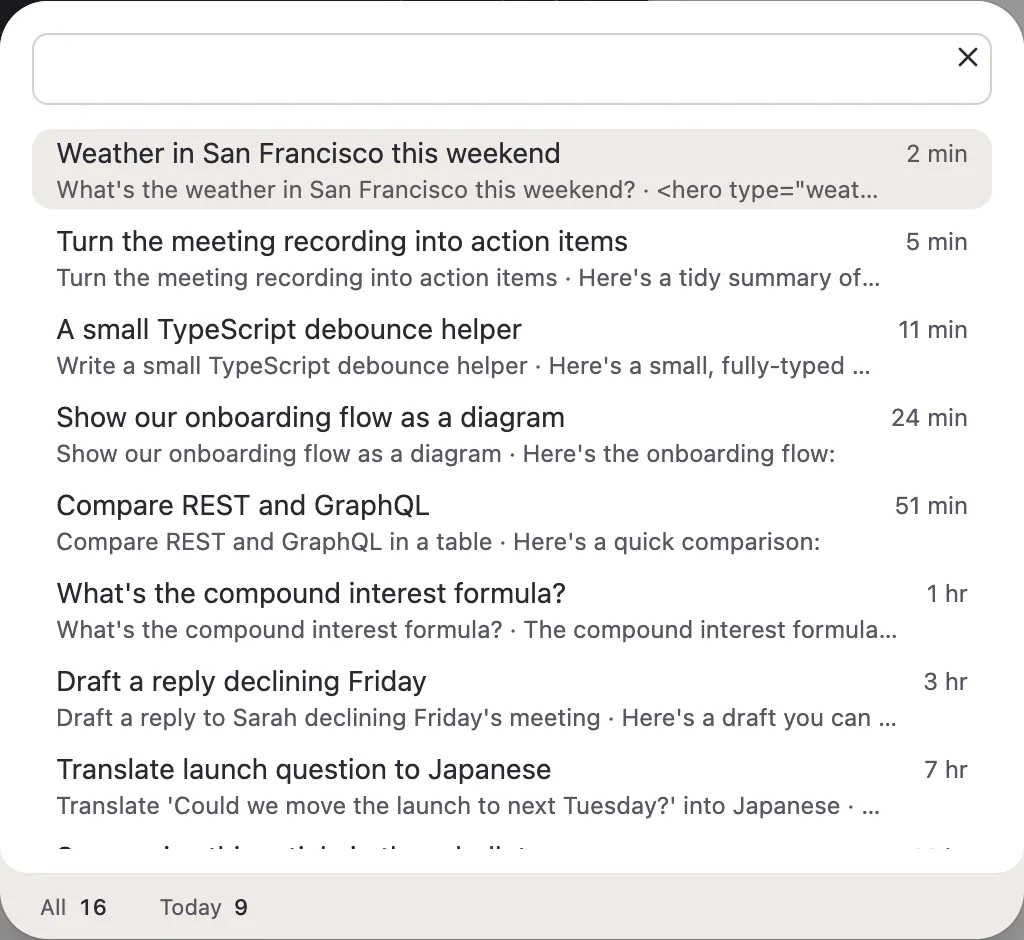
  • Search past chats like Spotlight: one search field, with results grouped into today, yesterday, the past week, the past month, and earlier. The stats bar is gone, and matching words stand out in the preview. ()
  • See whether your microphone hears you: four equal bars beside the mic in Settings light up as you speak. ()

Improvements

  • Settings is a quieter stack of grouped cards: row icons and dividers are gone, and system permissions fold into one card that refreshes when you open it or come back to the window. Theme is three icons you can click, move with the arrow keys, or drag. (, )
  • The Dock icon always stays visible: closing the window no longer removes Viora from the Dock, and the hide switch is gone. "Launch at Login" now reads "Open at Login". ()
  • Dictation refinement is always on: the switch is gone, and transcripts keep the formatting and fluency pass. ()
  • Apps and Skills share a side directory: Apps are compact rows. Open one to see what Viora can do, and turn it off at the bottom of that page. If access was lost, the row and the page offer Reauthorize instead of a permissions checklist. The hint under "This Mac" is gone. Skills are a single column, and reading and editing happen on the same page. "Try in chat" is gone from both. (, , , )
  • Code in answers is easier to scan: type is one size smaller, Copy appears when you point at the block, and long snippets stay folded until you expand them. ()
  • Quotes are a quiet line of text: above a sent message, a quote is an arrow and the original words, lined up with the text. The same line sits inside the input, with a button to remove it. ()
  • The conversation scrollbar floats beside the messages: it stops above the input instead of being cut off, and shortens when you pull past the edge. Pulling past the top or bottom springs back while you hold. Scroll to bottom glides the last screen instead of crawling and then snapping. On the Agent Card, the scrollbar no longer jumps in length as you scroll up, and the "Back to this question" arrow is gone. (, , , , , )
  • Home messages sit on the sides again: answers stay on the left, yours on the right, and the input stretches with the window. The input is a shorter capsule, the last message sits closer to it, and focus no longer draws a blue ring. (, )
  • An update ready to install appears above your avatar on the icon rail, with a short entrance the first time it shows. ()
  • Buttons, menus, and the orb respond more smoothly: presses ease in, the orb no longer stacks a bounce on every click, and the dictation copy pill and capsule status crossfade without shoving the layout. (, , , , )
  • Sign-in and pricing buttons on the website press in the same way as buttons in the app. ()
Changelog

0.9.3

What's New

  • Skills have their own pages: the Skills tab is now one list sorted by last update. Open a skill to read its instructions, turn it on or off, edit, or delete it. Creating and editing use a full-page editor that warns you before leaving unsaved changes. ()
  • A small copy pill replaces the big card when dictation can't find a text field: it sits next to the Orb, shows the full transcript on hover, and copies it with one click. Close it or press Esc when you're done. ()
  • Apps are grouped into "This Mac" and "Online services", shown as compact one-line cards with the switch right beside each app. ()

Improvements

  • The Apps page opens instantly: apps on this Mac appear right away, and the list you saw last time comes back while online services refresh in the background. ()
  • Tables in answers fit their content: short columns stay on one line, long ones wrap, text is one size smaller, and wrapped headers no longer leave a single character on its own line. Far fewer tables need sideways scrolling. (, )
  • The sidebar icon rail looks cleaner: the current page shows a filled icon on a lighter background, Apps now sits right below Chat, and your avatar stays highlighted while its menu is open. (, , )
  • Chat bubbles use a flat fill that stands out more clearly from the page in light theme. (, )
  • The Home input box lines up with the conversation, so no small notch shows beside its rounded corners while you scroll. ()
Changelog

0.9.2

Added

  • PRs show miko-reviewing during Miko review, followed by miko-pass, miko-failed, or miko-incomplete; new commits clear old results. ()
  • /llms.txt and /llms-full.txt now list 10 help questions, each linking to its English answer on help.viora.io. (, )
  • The homepage and features hub each link to the Mac dictation guide when that guide is published in the current language. (, )
  • /llms.txt and /llms-full.txt list published Chinese and Japanese core pages under /zh and /ja, grouped by language. They no longer describe /zh as a legacy redirect. (, )
  • AI crawlers can read Viora's public pages, and /llms.txt plus /llms-full.txt publish the current brand, pricing, comparisons, and FAQ from the deployed server bundle. (, )

Changed

  • Missing Feature, Compare, legal, changelog, and blog locale URLs redirect to the English page instead of returning 404. ()
  • Feature pages under /features/* now ship Chinese and Japanese MDX, so /zh/features/... and /ja/features/... render in those languages. Missing Feature, Compare, legal, and changelog locale pages 404 instead of falling back to English. Navbar, footer, and Resources links hide destinations that are unpublished in the active language. Remaining English placeholders on Chinese and Japanese marketing copy are translated. The locale check rejects English message fallbacks and missing feature locale files. ()
  • Each product now shows two PR checks instead of three, combining validation and its final result while preserving debounce, successful-check reuse, and the existing merge gates. ()
  • PR checks now debounce rapid pushes for 45 seconds and reuse successful component checks when inputs and base commit are unchanged. Miko combines CI failures per commit and deduplicates Codex repair requests. ()
  • Web, Mobile, Help, database migrate, and Miko jobs now run on GitHub-hosted Ubuntu, so the Mac Mini runners stay free for Desktop checks and builds. ()
  • Website download buttons now start the recommended Mac installer immediately, with a side menu for other chip versions. The old /download page redirects to the homepage. (, )
  • Website download buttons now use one capsule, list every available macOS architecture in the attached menu, and read “Download for macOS”. (, )
  • Local dev commands now go through portless by default, so Web/API/Help/Mobile use stable HTTPS .localhost URLs such as https://viora.localhost. ()
  • Marketing pages and anonymous pricing can now be served from the Cloudflare edge cache, so repeat visits skip a full server render. (, )
  • Move the website to TanStack Start, Vite, and Paraglide while preserving existing URLs and Desktop sign-in contracts.

Fixed

  • Repeating or overlapping a paid credit invoice no longer adds that credit grant twice. The balance and ledger stay on the single successful payment. (, )
  • CI repair requests keep their own workflow and now use the collaborator PAT accepted by Miko, with deduplication tied to the authenticated account ID. ()
  • Website and help links now lead directly to the right pages, localized page descriptions are clearer, and public email links remain usable.
  • The language suggestion banner is written in the language it offers, including the dismiss label, instead of following the language of the current page. (, )
  • The website favicon uses rounded corners, matching the header logo, instead of a hard square. (, )
  • Miko now follows up when its own repair commits still fail CI, and includes Test Governance failures in the combined repair request. ()
  • Web production builds now include React's runtime dependency and verify page rendering from the standalone artifact, preventing a healthy-looking container from serving 500 errors.
  • Web production db:migrate keeps drizzle-kit@0.31.10 with a local error-output patch, and pending SkillHub / feedback migrations are now idempotent. (, )
  • Feature guide URLs such as /features/ask-in-place now render their own pages instead of the shared /features hub. The same nested-route fix also restores /use-cases/messages and blog category pagination. Retired blog feature URLs keep their 301s when they include a locale prefix or trailing slash. ()
  • The website dashboard sidebar keeps its rail visible, including the icon-collapsible account shell, instead of collapsing to a zero-width column. (, , , )
Changelog

0.9.1

What's New

  • Manage local connectors from Apps: calendar, reminders, mail, contacts, and local files now share one Apps page with clearer permission onboarding. ()
  • The main window remembers its last size and position after you close it and restores them the next time it opens. (, )

Improvements

  • Dictation no longer sends selected text: selection capture and upload were removed; dictation uses the target app snapshot only. (, )
  • Selected-text quoting is simpler: removed “Add to conversation” from the selection menu and switched the quote arrow to a return style. ()
  • Custom dictionary hotwords work again in Agent mode. (, )
  • Agent answer bubbles stay visible in dark theme with tighter spacing between turns. ()
  • Circle screenshots follow the correct display when you move the pointer between monitors, while keeping the first-frame cache on each screen. (, )
Changelog

0.9.0

What's New

  • Dictation gets to work while you speak: audio is sent as you record, with a quicker recording start and less waiting after you release the key.
  • A new floating orb responds to your voice: refreshed light and dark appearances make listening and thinking easier to recognize.
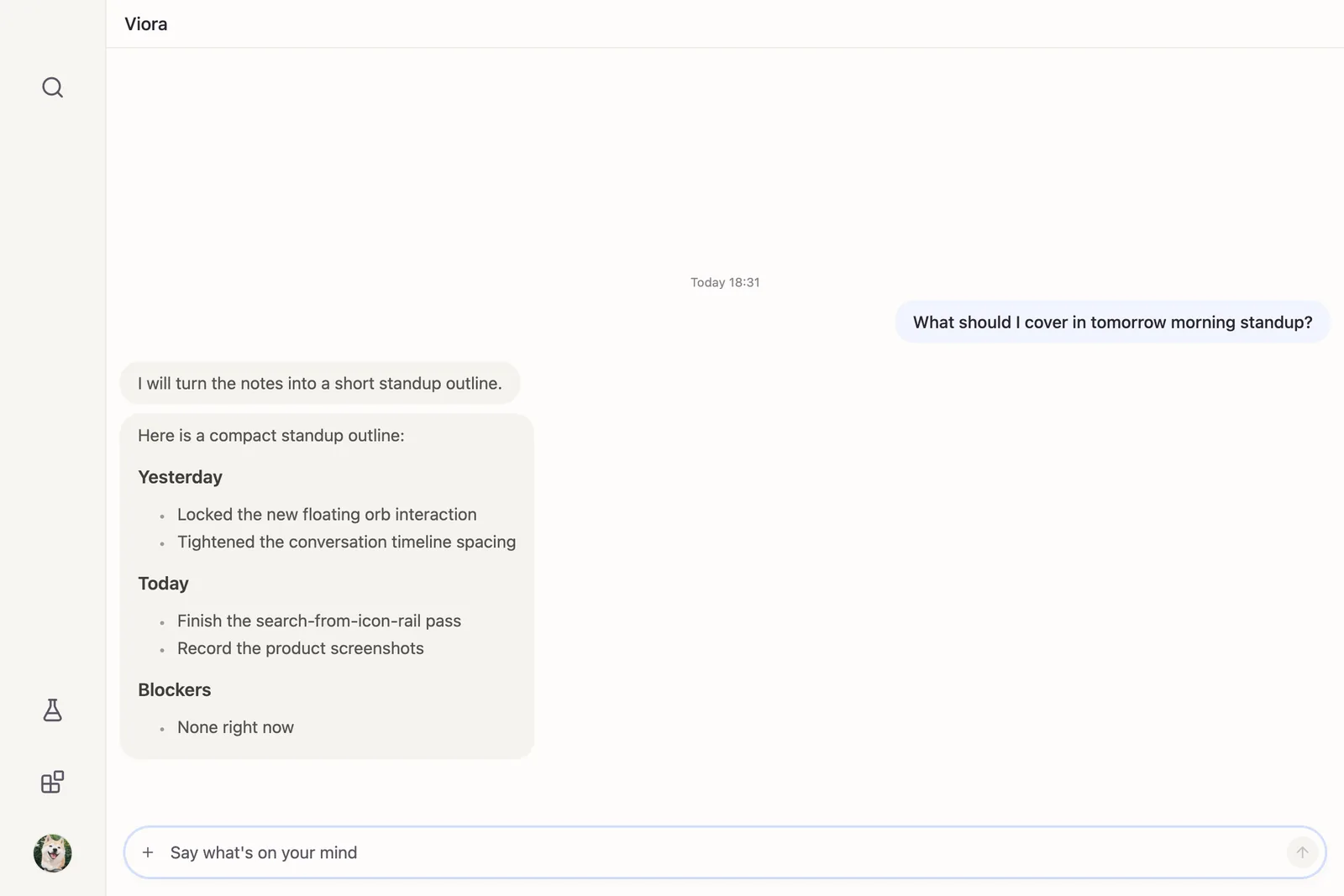
  • Find past conversations from a compact icon rail: the sidebar is icons only, and Search is where recent chats live instead of pinned or archived lists.
    Home window with the new icon rail
    Search recent conversations
  • Jump from a quote back to its original message: click a quoted passage to find it in the conversation, and copy or quote individual answers from their hover controls.
  • Computer Use can click for you: supported actions now show compact receipts in the conversation.

Improvements

  • Agent Card keeps your place when reopened: loaded history no longer briefly collapses and shifts the passage you were reading.
  • Home and Agent Card share a clearer conversation layout: progress notes appear as messages, answers use more comfortable widths and spacing, and the input no longer shows Stop or Answer Now buttons.
  • The first dictation after a break is more reliable: expired sign-in credentials refresh before recording is sent, with clearer recovery when a connection is rejected.
  • Retry a failed dictation without recording again: outside private mode, the most recent eligible failed recording stays available for retry in Settings.
  • Working with selected text is more dependable: selection is captured when you press the shortcut, including improved support for WeChat article text, without holding up processing when you release it.
  • Dictation preferences are easier to use: Chinese dictation can use spaces instead of punctuation, and dictionary entries no longer briefly appear twice while saving.
Changelog

0.8.61

Improvements

  • Agent voice replies play at the correct speed: spoken answers no longer sound twice as fast.
  • Queued voice replies no longer stall later playback: a rate change or unfinished clip no longer blocks the next reply from playing.
Changelog

0.8.60

Improvements

  • Push-to-talk starts processing sooner after you release the key: Viora no longer waits through a full silence check, so dictation and voice tasks move on faster.
  • No invite code is required after sign-in: you can use Viora without binding an invite code first.
  • Agent Card feels tighter: chat and input use less side padding, and the bottom blur fade is gone.
  • Archived conversations stay off the conversation page: archived chats no longer reappear from an old cache.
Changelog

0.8.59

Improvements

  • The backend now chooses the Agent model: Settings no longer include a model picker, and new Agent tasks no longer upload a model field.
  • Long permission titles no longer break the floating capsule: oversized confirmation titles are truncated and remain readable in a tooltip.
  • The main window stays in front after an Fn task: finishing a function-key task no longer sends the main window behind other apps.
  • Home permission countdown ring animates correctly.
Changelog

0.8.58

Improvements

  • Permission requests stay visible while Agent activity continues: Home no longer loses a pending confirmation when unrelated voice or streaming events arrive.
  • Permission cards state the exact action first: Gmail, Slack, Google Calendar, Notion, and Linear confirmations now lead with the specific operation Viora is asking to perform, while keeping recipients, content, and changes available below.
Changelog

0.8.57

Features

  • Review connector actions with the details that matter: Gmail, Slack, Google Calendar, Notion, and Linear permission requests now show a branded preview of the message, event, page, issue, or change before anything is sent or updated.

Improvements

  • Permission decisions are clearer and more controlled: action-specific confirmation buttons, a visible reject countdown, and a single current decision make sensitive Agent actions easier to audit without opening Agent Card unnecessarily.
  • Home stays where you are reading when an answer is saved: the transition from a live response to conversation history no longer pulls the page to a different message.
Changelog

0.8.56

Improvements

  • Agent Card reopens where you left it: closing and reopening longer conversations no longer makes the scrollbar shrink, reload, or jump to another message.
  • Pinned conversations stay pinned reliably: sidebar changes now finish syncing before the list settles, so overlapping history refreshes no longer undo a pin.
  • Viora comes to the front on a cold start: launching the production app now focuses the main window reliably instead of leaving it behind other apps.
Changelog

0.8.55

Improvements

  • Agent Card stays where you are reading when an answer finishes: manually following a streaming reply no longer sends the conversation back dozens of messages at completion.
Changelog

0.8.54

Features

  • Control foreground Mac apps with Computer Use: enable it from Apps to let Viora observe, type, click, and read supported apps while sensitive destinations remain blocked.
  • Keep Agent conversations moving with follow-ups: add text or images while a task is running, then retry the complete question without losing follow-up screenshots.
  • Understand Agent activity at a glance: tool-specific icons and clear succeeded, failed, cancelled, or unknown results now stay consistent across live and saved conversations.
  • Get clearer voice feedback: dictation now shows when transcription is in progress, while no-speech, connection, and timeout cases provide calm feedback and direct recovery actions.
  • Manage skills with less friction: open a skill by clicking its card, edit within clear limits, and delete it directly without navigating suggestion-review screens.
  • Copy code before the answer finishes: visible code blocks can be copied while Viora is still streaming the rest of the response.

Improvements

  • Home stays stable from launch through answer completion: the main window keeps focus on startup, completed responses no longer flash during handoff, and Agent status labels better reflect the current action.
  • Agent Card is easier to navigate: keyboard focus follows visible controls, off-screen messages reveal correctly, and reading position is restored after reopening.
  • Computer Use is safer and more reliable: turning it off now prevents background connections and diagnostic actions; the signed Viora Helper runs directly under its branded identity; window screenshots, permission decisions, and visual coordinates fail closed instead of guessing.
  • Settings preserve your place: opening Settings from the menu or tray keeps the underlying page, and expandable sections now transition consistently with Reduced Motion support.
  • Search and sidebar updates shift less: search counts reserve space while loading, and conversations move smoothly between Recent and Pinned.
  • Home text requests now include your enabled custom skills, matching the behavior of voice and Capsule Agent requests.
Changelog

0.8.53

Features

  • Approve Agent actions directly from the capsule: permission requests now appear with clear Deny and Allow controls plus a visual countdown, while Agent Card stays closed unless you choose to open it.
  • See when Viora uses Pro capabilities: Agent activity now confirms when long-term memory, a learned skill, or deep reasoning was actually used, with relevant upgrade guidance for Free users.
  • Copy quoted context with one click: quote previews in Home and Agent Card now copy the selected text directly to your clipboard.

Improvements

  • Account and plan controls are easier to find: the sidebar account summary now keeps your profile, current plan, and plan management entry together.
  • Existing memories stay safe on Free: saved memories remain visible and read-only, with a clear path to resume memory updates by upgrading to Pro.
  • Feedback is easier to investigate: Agent and Dictation feedback now keeps the matching run details, helping support locate the exact issue faster.
  • Agent Card background refreshes stay out of the way: brief cloud-history problems are recorded quietly instead of showing a global warning or interrupting the card.
Changelog

0.8.52

Features

  • Conversation history now follows your account across devices: Home, Agent Card, and the capsule can restore cloud-backed conversations while keeping recent local history instantly available and each account's data separate.
  • Add files by dragging them into Viora: drop images or local files onto the capsule, Agent Card, or Home to attach them to your next message.
  • Quote part of an Agent answer in a follow-up: select text from an answer and carry that exact context into your next question.

Improvements

  • Recent conversations stay usable through weak connections: cached content appears first, offline changes retry automatically, and clear status messages explain when cloud details need another attempt or sign-in.
  • Preview sign-in and transcription are more reliable: Preview authentication returns to the correct app, and signed-in transcription requests consistently include the active account.
  • Agent answers are easier to read: dollar prices no longer interfere with inline formulas, and failed answers use a calmer, more compact presentation.
  • Agent Card keeps completed follow-up answers intact: submitting a new question no longer lets a question-only snapshot replace the full response when the task finishes.
  • Everyday controls feel steadier: Agent settings menus no longer jump when opened, connected apps keep their original order, and the capsule settles correctly when a task finishes.
Changelog

0.8.51

Features

  • Open images in Viora from macOS: use Finder or another app's Open With action to add supported images to a new Agent message and continue directly in Agent Card.

Improvements

  • The macOS sidebar feels more native: a system frosted material now blends with the desktop while respecting reduced-transparency preferences.
  • Sidebar resizing stays smooth and predictable: dragging responds with less work and restores the intended width after collapsing.
  • Desktop text and controls feel more consistent: typography, spacing, and compact interface elements now share clearer visual measurements across conversations, settings, Memory, Apps, and Skills.
  • Memory empty states are clearer: removed an action that could not produce a visible result, leaving a simpler explanation of when memories will appear.
Changelog

0.8.50

Features

  • Open documents in Viora from macOS: use Finder or another app's Open With action to add PDF, Office, text, Markdown, and CSV files to a new Agent message without changing your default apps.
  • Agent answers display more kinds of structured content: LaTeX formulas and complex Markdown tables now render more clearly in Agent Card and shared answer images.

Improvements

  • Fn screenshot requests fail safely: if Viora cannot capture a valid selection, it now explains what happened and stops instead of silently sending a voice-only request.
  • Agent Card keeps your reading position more reliably: follow-up messages no longer pull you away from where you were reading, and clicking the orb to close the card no longer causes it to reopen immediately.
  • Subscription status updates sooner: Desktop refreshes your current plan after checkout and at startup, so paid access appears without a manual refresh.
  • Production and Preview stay separated: sign-in, payment, and app-connection links return to the matching Desktop environment instead of opening the wrong app.
Changelog

0.8.49

Improvements

  • Short Fn taps no longer create empty Agent conversations: cancelling before recording begins no longer leaves an interrupted session in Agent Card, Home, or history.
  • Sidebar conversation jumps are more predictable: choosing a historical message now moves directly to a consistent reading position without unexpected scroll animation.
  • English sidebar text renders cleanly: letters with descenders are no longer clipped in conversation lists and related sidebar previews.
  • Agent progress labels are calmer and stay in your language: tasks begin directly with Thinking, then switch only when real tool work or an answer starts; generic tool activity no longer leaks English into Chinese or Japanese interfaces.
Changelog

0.8.48

Improvements

  • Agent Card opens and closes cleanly: fixed incorrect fixed heights and lingering content after the card is collapsed.
  • Conversation search keeps historical titles: search results now show the saved conversation title instead of losing it.
  • Desktop app connections stay with the right account and environment: browser authorization returns to the matching Desktop session and refreshes the connection reliably.
Changelog

0.8.47

Improvements

  • Agent Card stays responsive with long histories: opening and closing large conversations is faster, with less content flashing or unnecessary work.
  • Conversation reading positions are more reliable: older sidebar entries and manually reopened Agent Cards return to the intended place without jumping.
  • Live answers remain easier to follow: Agent Card keeps the newest streaming content in view and can continue loading multiple pages of older history.
  • Shared images display CJK text correctly: Chinese, Japanese, and Korean content is preserved more reliably when creating share images.
Changelog

0.8.46

Features

  • Agent model choices are now visible in Desktop: available models can be selected from the current backend configuration.

Improvements

  • Home conversations reopen faster: switching tabs keeps the current conversation ready and reduces the initial history load.
  • Agent Card answers feel more stable: fixed history flashes, completion-time scrolling, streaming height shifts, and code-block actions that could stay disabled.
  • Long sessions are easier to browse: the sidebar timeline now loads older conversations only when needed.
  • Voice playback and interface motion are smoother: final speech playback is more resilient, while card, switch, selection, and scrolling motion feels steadier.
  • Home input is clearer: fixed a solid overlay above the composer that could obscure nearby content.
Changelog

0.8.45

Features

  • Agent retries are easier to reach: historical answers now show the retry action, and retry behaves consistently between Home and Agent Card.
  • Attachments and image results are smoother: Home has a clearer attachment menu, and generated image previews are easier to inspect.
  • Apps and Skills are easier to navigate: Extensions is split into a cleaner Apps entry and a dedicated Skills page.

Improvements

  • Agent Card history opens faster: first-time history loading is less likely to stall or feel blocked.
  • Agent Card input is more reliable: fixed cases where spacing, overlays, drag selection, or pinned mode could make the input hard to click.
  • Agent Card timing and motion feel steadier: answer streaming, scroll behavior, date labels, button spacing, and floating material are calmer and more consistent.
  • Desktop file and dictation shortcuts are safer: Finder multi-select paths stay separated, screenshot selection no longer blocks Fn shortcut upgrades, and the dictation start cue fires earlier.
Changelog

0.8.44

Improvements

  • Desktop updates are safer: Viora now waits for release packages to pass final verification before offering the update.
Changelog

0.8.42

Features

  • Desktop shortcuts are clearer on macOS: Fn now opens Agent and Right Command starts dictation, with Auto mode removed so each shortcut has one predictable job.
  • Dictation inserts into the intended place more reliably: Viora keeps track of the active target while listening, including Home input and the focused app.
  • macOS menu bar controls are available: common desktop actions are now reachable from the system menu bar.
  • Recent conversations now rename in a focused dialog: sidebar renaming uses a clearer modal flow instead of inline editing.

Improvements

  • Selected-text dictation starts faster: Viora preloads selected text more efficiently before shortcut dictation.
  • Capsule and Agent Card motion feels calmer: hover reveal, click pulse, pill text changes, and card open/close transitions are smoother and easier to follow.
  • Agent answers stream and settle more naturally: live output, jump-to-latest behavior, scrollbars, copy buttons, and finished answers feel steadier.
  • Update prompts are easier to find: restart-to-update now lives in the sidebar instead of interrupting the capsule.
  • Voice capture is clearer: desktop recording uses a higher default quality for steadier dictation input.
  • Sidebar, Memory, and account surfaces feel lighter: loading placeholders, avatar fallback, menus, and popovers are cleaner and more consistent.
Changelog

0.8.36

Features

  • Heartbeat Feed is available in Dynamic: developers can browse Dream, Research, and Agent Note updates with clearer stream cards, counts, and latest activity.
  • Capsule can stop an in-progress Agent task faster: the working capsule now exposes a stop action on hover.
  • Capsule and Agent Card feel more polished: refreshed glass, paper, and glow materials make the floating experience easier to read.

Improvements

  • Agent Card opens and closes more predictably: auto-opened cards now close correctly when clicking outside, and macOS wake no longer unexpectedly pops the card or capsule back open.
  • Capsule click-through behavior is safer: transparent and edge areas are less likely to swallow clicks, including pinned Agent Card layouts.
  • Streaming answers are easier to read: live code highlighting, live expansion, card shadows, and response rendering are steadier while Agent is writing.
  • Tool permission prompts are smoother: restored sessions no longer repeat prompts, batch allow is back, and confirmation sheets have cleaner spacing.
  • Recent conversations are easier to scan: the sidebar timeline collapse control now stays anchored at the bottom.
  • Desktop account and menu surfaces look more consistent: account menu headers and related popovers now align better with the rest of the app.
Changelog

0.8.35

Improvements

  • Capsule clicks are more precise: only the orb itself opens Agent Card, so nearby empty space no longer catches the mouse.
  • Agent Card closes more cleanly: pending open actions are canceled while closing, preventing the card from reopening right after it collapses.
  • Clicks pass through more reliably after closing: invisible Agent Card areas no longer block clicks in other apps or pages.
  • Sign-in and access state restore more steadily: Viora recovers account, permission, and connector status faster during startup and account changes.
Changelog

0.8.34

Features

  • Rename conversations from the sidebar: right-click highlights the row, then choose Rename for quick inline editing.
  • Memory page redesigned as a single read-only view: see your profile, personas, and recent events on one cleaner page.
  • Agent history loads in pages: long conversation lists load faster with paginated fetching and a Load More action.
  • Chat search is available from more screens: the sidebar collapse and search shortcut now work across all routes.

Improvements

  • Capsule hover and click feel more reliable: opening, hovering, and closing the capsule and Agent Card no longer fight each other.
  • Force-agent shortcut defaults on Windows and Linux: non-mac platforms now use Ctrl+Alt+Space, with safer migration from older bindings.
  • Home tool approvals stay on Home: agent confirmation prompts no longer jump ownership to Agent Card, and repeated prompts no longer keep reopening the card.
  • Switching accounts refreshes your session correctly: signing in as a different user no longer reuses the previous account's access for hours.
  • Connectors update faster after OAuth: returning from a connector sign-in refreshes the connection list without a long delay.
  • Conversation column width stays consistent: message columns keep a steadier side margin relative to the input box.
  • macOS permission requests use the system flow: accessibility, screen recording, and full disk access now go through a more native permission helper.
Changelog

0.8.33

Features

  • Dictation history is searchable: filter past dictations, see match counts, expand full text, and move through results from the keyboard.
  • Agent Card opens with a smoother capsule transition: expanding from the capsule now feels more fluid and intentional.
  • Capsule stays available by default: the always-show setting is gone, so the capsule remains ready without extra setup.

Improvements

  • Agent Card actions wait until the answer is done: share, copy, and follow-up controls no longer appear while a response is still streaming.
  • Capsule input is less likely to hide behind other apps: the input layer stays above the active window more reliably.
  • Agent Card layout is cleaner: the top fade, action spacing, and input alignment are more balanced.
  • Archived and recent conversations stay in sync: archived records no longer linger in Agent Card, and recent conversations flicker less after an answer finishes.
  • Voice questions show up immediately: capsule voice input now appears as an in-progress message while Viora is working.
  • Conversation jumps feel steadier: jumping to the latest message avoids the old pre-jump flash and large blank gap.
  • Tooltips are more consistent: hover hints now share the same light card style and timing across the app.
  • Chinese input and cursor tracking are steadier in the capsule: IME layering and cursor placement behave more predictably.
  • Home input is ready faster: the conversation box focuses more reliably when Home opens or returns to the foreground.
  • Response reading and sharing look better: table widths, scrollbars, and shared answer cards have more comfortable spacing.
Changelog

0.8.32

Features

  • Search all conversations from the sidebar: find chats globally without opening each thread or using Ctrl+F inside a conversation.
  • Chat search is easier to use: keyboard navigation and match counts help you jump to the right conversation faster.
  • Archive conversations from the sidebar: archived chats stay in sync across Home and Agent Card, and can be restored in Settings.
  • Dictation is easier to reach: dictionary and dictation history now live in a dedicated top-level Dictation panel.
  • Jump to the latest message on Home: a scroll-to-bottom button makes long threads easier to follow.
  • Smarter output volume ducking: the manual ducking toggle is gone; Viora now chooses the right mode based on whether headphones are connected.
  • Refreshed visual color system: the app now uses the redesigned Viora palette for a clearer, more consistent look.

Improvements

  • Sidebar account badge is clearer: theme-colored initial circle with a single-line name and plan display.
  • Sidebar drag feels more responsive: smoother follow-through, with auto-collapse when dragged to the bottom.
  • Sidebar expand animation matches collapse: opening and closing now feel symmetric.
  • Pin and archive icons show tooltips: hover for 600ms to see what each icon does.
  • Agent task progress is easier to scan: details expand while running, collapse when the answer starts, and hide timing when no tools were used.
  • Agent Card opens at the right time: auto-open now respects whether the main window is in the foreground.
  • Single-window Agent Card interactions are steadier: close, focus, and window-boundary behavior is more reliable after the capsule merge.
  • Chat search overlay looks cleaner: fixed duplicated background tint and alignment issues.
  • Narrow conversation layouts keep side padding: small windows still preserve readable left and right margins.
  • macOS title bar behavior is more polished: fullscreen button spacing and Home drag gaps are fixed.
  • Code block line numbers no longer crowd commands: spacing in capsule Agent Card code blocks is more comfortable.
  • Home input stays available while offline: delayed offline detection avoids disabling typing during auth sync.
  • Voice responses are no longer subscription-gated: all users can use voice responses.
  • Onboarding adds a screenshot hint: the selected-text step now mentions screenshot-based questions.
Changelog

0.8.31

Features

  • Agent timeline feedback is easier to send: right-click a conversation entry to share feedback from the context menu.
  • Agent timeline entries can be shared or deleted: use the context menu to share or remove a conversation from the timeline.
  • Agent can ask for permission before sensitive actions: choose how strictly Agent must request approval before running tools.

Improvements

  • Mermaid diagrams are easier to read: Agent answers show full-height diagrams, and clicking one opens a larger preview you can pan and zoom.
  • Shortcut hints are clearer across empty states and input areas: push-to-talk shortcut displays now stay consistent and support multiple bindings.
  • Calendar tool failures are easier to diagnose: when EventKit tools fail, Agent now keeps clearer error details instead of losing them.
Changelog

0.8.30

Features

  • Home mirrors client tool confirmations: tool approval prompts in Home now match the Agent Card experience.
  • Main sidebar width is adjustable: drag the sidebar edge to set a width that fits your workflow.

Improvements

  • Home offline notice sits in the conversation input area: when you're offline, the warning appears above the input and typing is disabled until you're back online.
  • Agent Card opens fully when a conversation finishes: the panel expands automatically when a session reaches its final state.
  • Session recovery no longer repeats tool prompts: replaying a recovered conversation won't ask you to confirm the same tool again.
  • Offline status clears after you reconnect: signing in or syncing again no longer leaves a stale offline banner.
  • Memory boundaries can be deleted while editing: editing a boundary chip now lets you remove it instead of only canceling.
Changelog

0.8.29

Improvements

  • Extensions catalog layout is cleaner on wide screens: the sticky header and content area now stay horizontally aligned.
Changelog

0.8.28

Features

  • Home Focus Mode: focus on the current conversation with a cleaner, less distracting Home view.
  • Code in answers is easier to read: Markdown code blocks now show syntax highlighting in Agent responses.
  • Empty states feel more consistent: main window empty views now share a unified layout across Home, Memory, Skills, and Extensions.

Improvements

  • Recent conversations timeline is clearer: sidebar timeline display and pinned entries are easier to scan.
  • Home and Agent Card scrolling is steadier: less jitter when reading long threads, and scroll position is preserved when opening, closing, or minimizing panels.
  • Global shortcuts and Dock behave more predictably: shortcut handling and macOS Dock visibility are more reliable during daily use.
  • Agent details are easier to follow: top actions are reordered, session timing display is fixed, and records sort by when each session started.
  • Sign-in lasts longer: desktop login sessions stay active longer before asking you to sign in again.
  • Background tasks clean up better: interrupted tasks stop lingering shell processes instead of staying active in the background.
Changelog

0.8.27

Improvements

  • Screen capture permission waits are more reliable: when system permission stays unresolved, capture requests now end with a clear timeout instead of leaving Agent stuck.
  • macOS restart-to-update is steadier: choosing to restart and install an update now hands off to the installer flow more reliably.
  • Conversation input hints are clearer: desktop chat placeholder text better matches the current conversation context.
Changelog

0.8.26

Features

  • Agent drafts follow you across surfaces: start writing in Home or Capsule and continue from the other place without losing the text.
  • Dictation history is now part of Settings: past dictations are easier to browse, retry, delete, and review with paged history controls.

Improvements

  • Settings are easier to scan: the desktop menu and settings layout are simpler, with cleaner rows for dictation history and dictionary actions.
  • Global shortcuts are steadier: shortcut modifier keys are less likely to get stuck in the wrong state and trigger an unintended action.
  • Home and Agent entry points are calmer: the top Agent search and temporary mode entry are hidden for now, reducing controls that could feel unfinished or confusing.
Changelog

0.8.25

Features

  • Desktop sign-in feels smoother: sign-in now returns to Viora more reliably after finishing in the browser, with clearer login and registration screens.
  • Dictionary management is easier to find: dictionary controls now live in Settings, keeping Home cleaner while making word management feel like a dedicated preference.

Improvements

  • Agent Card history is steadier to read: expanding history, loading older messages, and following new output are less likely to jump while reading long conversations.
  • Agent Card layout is more reliable: the input area no longer covers the scrollbar, long tables wrap more naturally, and closing or collapsing flashes less.
  • Agent sessions stay more continuous: current tasks and capsule state are less likely to be lost or drift after page changes or brief offline moments.
  • Agent search closes more predictably: the search overlay behaves more consistently when finishing search or switching actions.
Changelog

0.8.22

Improvements

  • Agent text follow-ups keep more context: follow-ups now carry the current desktop context and previous answer, while history fills in sooner so the conversation feels less disconnected.
  • Agent voice and streaming answers feel smoother: real-time spoken playback and live text rendering are less likely to stutter while an answer is coming in.
  • Memory cards are easier to scan: facet card borders are softer and clearer, making saved memory details easier to separate at a glance.
Changelog

0.8.21

Improvements

  • Response panel expands while typing or confirming tools: when you reply in Agent Card or confirm a tool action, the panel automatically opens the full conversation view so context stays visible.
Changelog

0.8.20

Improvements

  • Agent Card feels steadier: opening animations are smoother with no empty-window flash; the Dock stays visible while Agent Card is open; dragging the capsule collapses Agent Card; text input no longer passes clicks through, and focus handoff is more reliable.
  • Response panel is easier to read: history scrolls more smoothly with better top paging and pull-to-load for long threads; in-panel clicks and pointer moves feel complete again, and bottom spacing is corrected.
  • Agent answers display more reliably: streaming text no longer duplicates the final answer; observation follow-ups stay in sync with Agent Card; conversation and Dock state drift less.
  • Links and sign-in: external links open more reliably, and deep-link sign-in checks respond faster.
  • Sharing and Markdown read better: share images adapt to table width; wide tables scroll horizontally so CJK text is not squeezed vertical; code-block controls are simpler.
  • Sign-in and Memory: logging in no longer skips onboarding by mistake; capsule auth status refreshes after sign-in; Memory archive scrolling is fixed.
  • Dictation default: new users start with dictation polish turned off, so input is less likely to be rewritten without asking.
Changelog

0.8.19

Features

  • Memory moves more smoothly: switching between Memory views now feels more natural, and memory content loads in smaller pieces so the page is easier to follow.
  • Signed-out desktop surfaces are cleaner: Capsule-related controls stay hidden until you sign in, reducing unavailable actions.

Improvements

  • Agent Card controls are easier to use: the input area, permission prompts, thinking controls, and bottom spacing are cleaner and more predictable.
  • Screen capture and recording settings are more reliable: screenshot actions keep their event wiring, and screen recording settings refresh correctly.
  • Agent answers read and sound better: Markdown line breaks are preserved more reliably, and spoken answer audio is combined more cleanly.
  • Fn and Control flows are steadier: shortcut handling is less likely to force the wrong Agent mode.
Changelog

0.8.18

Features

  • Home and dictation feel clearer: the main toolbar and dictionary area are easier to scan, with a more obvious place to add new dictionary entries.
  • Capsule image preview is easier to move: you can drag images in the preview, and releasing after a drag no longer accidentally opens them again.
  • Extensions is quicker to use: search is gone in favor of direct actions on app cards, so connecting and opening apps takes fewer steps.
  • Memory editing is smoother: edit dialogs look cleaner and are easier to work with when updating saved notes.
  • Onboarding shows edge summon: the tutorial now demonstrates summoning the capsule from the screen edge with a clearer animation.

Improvements

  • Agent stays in sync across windows: capsule, Agent Card, and the main window now share the same conversation state more reliably, including when privacy timers expire.
  • Agent Card is easier to follow: reopening scrolls to the bottom, external links open correctly, and screen capture runs automatically when Agent needs to see your screen.
  • Response panel and sharing look better: scrolling is steadier, share images have more room, and tool confirmation titles show the right action.
  • Agent voice is more reliable at the end of a reply: spoken answers are less likely to show wrong timing or metadata while a turn is still finishing.
  • Fn dictation sounds clearer: voice capture uses a higher-quality recording setting for cleaner input.
  • Settings and inputs are tidier: the settings dialog is simpler with one account menu, the chat input has better spacing, and the + button tooltip stays out of the way.
  • Small UI fixes across the app: menu bar capsule and dictionary checkmarks are no longer clipped, memory tabs align more cleanly, and Markdown tables in answers are easier to read.
Changelog

0.8.17

Improvements

  • Agent voice playback is smoother: streamed spoken answers now use a more continuous playback path, reducing gaps, overlap, and late audio after stopping.
  • Desktop surfaces feel more consistent: inputs, cards, popovers, dialogs, Memory, Extensions, and Home now follow a clearer corner-radius system so the app feels more settled.
Changelog

0.8.16

Features

  • Richer in-app image preview: session images open through a clearer preview flow with more consistent window controls across capsule and chat surfaces.

Fixes

  • Response panel: scroll position is preserved again, with steadier positioning while Agent answers stream in.
  • Share images: title line spacing and table text are less likely to overlap in exported images.

Improvements

  • Web: homepage FAQ, broader pricing copy, and Node 22 aligned CI and Docker documentation.
Changelog

0.8.15

Features

  • Extensions now include apps and skills together: the old Skills area is now Extensions, with separate Skills and Apps tabs, connector cards, and app detail pages so supported services are easier to browse and connect.
  • Custom skills are easier to import: you can upload a skill from a .zip package or a standalone SKILL.md, with clearer validation when the file is not usable.

Improvements

  • Capsule docking feels more settled: the idle capsule sits more predictably at the screen edge, peeks out a little more clearly, and opens Agent Card with tighter spacing.
Changelog

0.8.14

Improvements

  • Fn dictation starts cleanly after Agent conversations: starting a new dictation after Agent finishes no longer incorrectly shows a network problem or a no-speech message.
  • Chinese settings copy reads more naturally: voice and output settings now use clearer Chinese subtitles that better match what each option does.
Changelog

0.8.13

Improvements

  • Agent streaming no longer repeats the current answer: when an answer finishes, history is less likely to reinsert the same turn above the still-visible response.
  • Completed dictation results are captured more reliably: fast-finishing dictation or Agent inputs are less likely to miss the final saved result.
  • Keyboard shortcut settings use consistent language: shortcut names, descriptions, and conflict messages now follow the current app language instead of falling back to untranslated text.
Changelog

0.8.12

Improvements

  • Dock visibility is user-controlled again: you can hide the Dock icon after closing the main window, while new installs keep the Dock icon visible by default.
  • Agent conversations are less repetitive: stopped Agent replies are less likely to appear twice in conversation history.
  • Agent Card stays out of the way during dictation: opening Agent Card is less likely to steal focus from an active dictation flow.
  • Fn Agent shortcuts are steadier: Fn follow-ups during Agent work are less likely to accidentally toggle the main window.
  • Agent streaming feels smoother: long answers update more cleanly while they are still being written.
  • Capsule windows look cleaner: transparent capsule windows no longer show native window controls.
Changelog

0.8.11

Features

  • Agent can handle multiple confirmations more calmly: when several actions need your approval, they are queued and shown in a clearer order instead of competing for the same space.
  • Google Calendar is easier to connect: Calendar now appears in connector setup alongside the other supported services.

Improvements

  • Agent Card stays more compact: temporary controls and confirmation areas take less vertical space and are less likely to open when they are not needed.
  • Connector setup gives clearer feedback: when a connector opens in the browser, Viora now shows a quick confirmation so the handoff is easier to notice.
  • Voice follow-ups in WeChat are more reliable: Fn dictation while Agent is running is less likely to be mistaken for the wrong kind of follow-up.
  • Sharing answers as images feels cleaner: copied answer images and the related popover layout are more consistent.
Changelog

0.8.10

Features

  • Memory has a clearer home: Memory is now organized into About You, Timeline, and Boundaries, making important context easier to scan and new dimensions easier to add.
  • Memory notes are easier to read: profile facts and quick notes use a tighter layout, with clearer empty states when there is not much saved yet.
  • Skills has a new workspace: custom skills, learned skills, and pending suggestions now have clearer sections, top-level actions, empty states, and connector access.
  • Custom skills can be paused: you can disable and re-enable custom skills and see when they were last updated.
  • Learned skills are easier to recognize: learned workflows now show clearer names, and pending suggestions are easier to inspect, edit, and decide on.
  • Add context while Agent is working: you can add another voice or text note from the capsule while the same Agent task is still running.
  • Agent can use the current screen: Agent can capture the current screen when needed to understand the window or content you are looking at.

Improvements

  • Agent progress is easier to follow: the capsule and Agent Card now show understanding, thinking, and active work states more clearly while a task is running.
  • Interrupting Agent is more reliable: pressing Esc or stopping a running Agent task now halts generation more consistently and leaves a clearer interrupted record.
  • Agent Card opens more reliably: fixed crashes after opening, accidental confirmation expansion, inaccurate hover targeting, and an extra close-button hint.
  • Confirming Agent actions is smoother: approval cards open, time out, and show results more predictably, reducing confusing or easy-to-miss states.
  • Streaming answers stay in order: Agent text, progress, and tool activity are less likely to appear out of sequence, and restored tasks are less likely to repeat the same action.
  • Agent Card history opens faster: recent history restores more quickly, and longer histories load in smaller steps to reduce waiting when opening the card.
  • Conversation history is cleaner: fewer duplicate records, less overflow from long content, and clearer selected-text references in both Agent Card and Home.
  • Voice follow-ups during Agent work are steadier: pressing Fn while Agent is already working is less likely to conflict with regular dictation and is more reliably attached to the current task.
  • Voice answer history is lighter: spoken playback chunks are no longer stored in Agent history, keeping history cleaner and faster to revisit.
  • Image sending is safer: oversized images are checked before sending and blocked with clearer feedback instead of failing later.
  • Screen capture feels more natural: screenshot permission guidance is more complete, manual screen capture no longer pulls Home in front, and Agent screen reads show clearer status.
  • Settings are simpler: the old hidden-Dock-icon option was removed and related controls were consolidated so settings take fewer steps to find.
  • Top switches are easier to click: Memory and Skills top controls are less likely to be mistaken for window dragging.
  • Home and empty states are more polished: search, dictation empty states, conversation empty states, Skills empty states, and developer previews have cleaner presentation.
  • Bold text renders more reliably: more Markdown bold styles now display as expected in answers.
  • Updates and downloads are more reliable: macOS installers are prepared separately for Apple Silicon and Intel, downloads are easier to pick, and the menu bar icon is included correctly.
  • Agent keeps its place during service updates: when Viora's service refreshes in the background, Agent can reconnect and continue with fewer stuck or lost-progress states.
Changelog

0.8.9

Features

  • Ask Agent with images: add images from your Mac or drag them into a conversation, preview them before sending, and open a larger preview when needed.
  • Capture your screen for Agent questions: press Fn in supported apps to select an area of the screen and send it with your question, including WeChat screenshot mode.

Improvements

  • Capsule and Agent Card stay better aligned: dragging near side Dock positions and returning to history keeps the card height and placement more consistent.
  • Updating Viora is more dependable: restart fallback after an update is more reliable, with quieter background reporting.
  • Fn shortcut handling is steadier: screenshot mode updates faster after app changes, and text selection checks are more reliable.
Changelog

0.8.8

Features

  • Selected-text questions keep their context: Agent questions started from selected text now show the quoted passage in the Agent Card and Home history, making it easier to revisit what was asked.

Improvements

  • Agent Card opens and moves more naturally: opening from the capsule, dragging the orb, and returning to the main window now keep the card in the right place with smoother companion motion.
  • Agent Card history is easier to scan: short answers use a better height, history expansion animates more smoothly, and jumping back to earlier questions lands more reliably.
  • Capsule dialogs are clearer: permission, no-speech, and restart prompts now have cleaner layout and more consistent wording.
  • Capsule interactions feel steadier: the capsule is less likely to move from tiny trackpad motions, opens the card more immediately, and shows cleaner response actions.
  • Small desktop polish: Skills actions use clearer labels, copy feedback is easier to notice, and the login page now links to the legal pages.
Changelog

0.8.7

Improvements

  • Home history is easier to browse: switching between Agent and Dictation history feels smoother, and recent dictations are easier to scan, search, and manage.
  • Agent tasks stay visible: Agent questions started from the capsule now appear on Home while they are running, so it is clearer what Viora is working on.
  • Conversation input looks cleaner while scrolling: messages can pass naturally behind the top corners of the Home Agent input box, while the lower edge stays covered.
  • Capsule shortcut behavior is more predictable: opening the Agent Card with Fn no longer makes the capsule unexpectedly collapse.
Changelog

0.8.6

Improvements

  • Quitting is more reliable: fixed cases where Viora could disappear from the screen but keep running in the background after choosing Quit or stopping the dev app.
  • Settings are clearer: the System permissions row in Voice & Output now opens reliably when clicked, and hidden meeting audio permissions no longer appear before that feature is available.
  • Voice response controls are easier to understand: updated the Voice & Output settings copy and clarified plan-gated voice response options.
  • Learned skill saving is more dependable: fixed a save flow that could fail when approving or editing learned skills.
Changelog

0.8.5

Improvements

  • More reliable Agent Card dragging: after moving the orb, the Agent Card restores its position and focus more consistently, reducing odd card states after a drag ends.
  • Cleaner Agent Card edges: fixed the bottom shadow being clipped so the card looks more natural near screen edges.
  • More accurate onboarding: users who have already completed onboarding will no longer be sent back into the tutorial by mistake.
Changelog

0.8.4

Features

  • Learned Skills management: the Skills page now separates custom skills from learned workflows. You can review pending suggestions, inspect why they were suggested, edit them, enable them, disable them, reject them, or delete them in one place.
  • Disconnect connectors: Settings now lets you disconnect linked services directly. After disconnecting, Viora refreshes connector availability so removed services are no longer offered as usable tools.
  • Four-position capsule docking: the capsule can settle in the top-left, top-right, left-edge hidden, or right-edge hidden positions. When docked on the left, the Agent Card mirrors its layout so it opens naturally from that side.
  • More flexible onboarding: the tutorial now teaches dictation, Agent questions, selected-text questions, and capsule opening with clearer steps, and you can skip it when you want to start using Viora immediately.

Improvements

  • Capsule edge hiding feels steadier: the hidden capsule now uses a narrower, side-aware trigger area and tucks slightly deeper into the screen edge, reducing accidental reveals while keeping it easy to bring back.
  • Agent Card visibility is more reliable: opening, closing, hovering, and dragging the capsule now keep the orb and Agent Card aligned, including after quick drag/hover gestures and repeated open/close cycles.
  • Onboarding focus works better across apps: clicking the capsule during onboarding now brings the right Viora window forward more consistently, and permission screens use clearer wording.
  • Streaming answers scroll more predictably: long responses keep the active content in view without fighting manual scrolling.
  • Connector status stays fresher: connector availability can now be refreshed across Viora windows, so tool choices better match the services currently connected.
  • Skills is simpler: the old SkillHub browsing and install flow has been removed so the page focuses on custom skills and learned workflows.

Fixes

  • Fixed an issue where the capsule could still react to edge-peek while a capsule dialog was open.
  • Fixed accidental capsule movement from tiny pointer shifts by requiring a real drag before repositioning.
  • Fixed several onboarding cases where the tutorial could lose focus, sit behind another window, or close at the wrong time.
  • Fixed a case where users with invite-bound access could still be treated as unauthorized when pressing Fn from the capsule.
  • Fixed capsule hover state drift and card visibility edge cases near screen boundaries.
Changelog

0.8.3

Features

  • Pin the Agent Card: a new pin button in the top-right keeps the card open — click outside, press Esc, or switch apps won't close it. Only the close button (which also releases the pin) will dismiss it.
  • Click outside to close: when not pinned, clicking anywhere outside the Agent Card (desktop, another app, or elsewhere in Viora) now closes it. If a dropdown or tooltip is open inside the card, the first click closes the menu and keeps the card open.
  • Stop mid-stream: while Viora is generating an answer on the home page, the send button turns into a red stop button. Tap it to interrupt — the generated content stays in place with a "Stopped" label, and any ongoing speech playback halts immediately.
  • Click the orb, start typing: opening the Agent Card via the orb now expands and focuses the text input in one motion. You can type the next question right away.
  • Cmd/Ctrl+W closes the Agent Card, and Esc also works when the Viora window has focus (even while pinned, Esc will release and close the card).
  • Processing pill on the orb: while Viora is working, a small label appears to the left of the orb showing the current step — "Understanding" → "Thinking" → current tool action — so you have a sense of progress even when the card isn't expanded.

Style

  • New Agent Card look: the card is rewritten to Viora's visual language — deep indigo text on warm white, with periwinkle accents. New typography: Cormorant Garamond for emphasis, Source Sans 3 for body, Noto SC for Chinese.
  • Activity timeline replaces the pill cluster: during streaming you now see a single italic line — "Viora is thinking" / "Running code" / "Browsing the web" — with gentle pulsing dots. Once the answer arrives it collapses into a "Did N things" summary; click any row to expand the request and response for that step. Tool rows show the key detail up front (first code comment, file path, URL, or query) so you can tell at a glance what happened.
  • iMessage-style day separators (Today / Yesterday / date) in the conversation history.
  • Conversation content is centered and capped at 768px on ultra-wide and fullscreen windows for comfortable reading.
  • User message hover bar simplified to timestamp · edit · copy (removed retry and info icons — both were redundant); action tooltips now drop down without arrows.
  • Privacy mode tooltip on the home page reads simply "Privacy mode" — the button color already indicates whether it's on.

Fixes

  • Currency amounts no longer render as math: values like $200 or $153.82 in Viora's answers were being swallowed by LaTeX and displayed as strange glyphs (e.g. ∗∗200∗∗). Fixed by disabling single-dollar math inline — block math $$…$$ still works.
  • No more startup flash on macOS: eliminated the brief appearance of Windows-style title-bar buttons during the first frame.
  • No more subscription loader flash on startup: cached access state is now read immediately, skipping the full-screen loader during cold launch when cache is available.
  • "Stopped" label now shows even for early interrupts: when you stop Viora before any text has streamed in, the card correctly shows "Stopped" instead of staying on "Thinking…".
  • Spoken opening lines are now written in the answer: the final TTS voice-over used to play but leave no trace in the written answer. Its content is now placed at the top of the written answer so what you hear matches what you see.
  • Tables breathe properly again: column widths are rewritten to adapt to content — narrow cards fill to the card's width, wider pages keep a sensible minimum width, and columns stay well-spaced regardless of how many there are.
  • Fixed timeline misalignment for code+sandbox tool calls: when a code execution triggered a sandboxed client tool (like Gmail forward), the request/response used to split across two rows. Now they stay together on the correct row.
  • Bottom of conversation scroll area has more breathing room so the thinking line and action buttons no longer crowd the input bar.

Improvements

  • Text input bar is now available in two sizes — the Agent Card uses a compact pill-shaped variant while the home page keeps the full-size one.
  • Home page dictation flow now converts the final TTS into a seamless pseudo-streaming effect when it arrives as a single chunk, so the answer never pops in abruptly.
Changelog

0.8.2

Features

  • Onboarding tutorial: new guided walkthrough with animated steps covering microphone permission, Fn shortcut practice, and edge-peek capsule interaction. Onboarding visuals unified to the Cloud Dancer warm palette.
  • Tool permission confirmation: tool-call prompts now use a Split Button with batch "Allow All" and a dedicated confirm-only mode, so you can approve multiple tool requests at once or selectively.

Improvements

  • Removed GitHub connector from the connectors catalog and consolidated shared UI components into @viora/ui.
Changelog

0.8.0

Features

  • Conversation history search: press Ctrl+F to open a floating search bar with match highlighting and navigation. Supports CJK word segmentation for Chinese, Japanese, and Korean queries.
  • Privacy mode: toggle via a ghost icon in the top-right corner of the conversation page. When enabled, local conversation records are not saved. The capsule orb's lock icon is replaced with a matching ghost icon.

Style

  • Cloud Dancer warm theme: replaced the cold-gray concrete palette with a warm off-white visual language across the entire app — all pages, cards, tooltips, dialogs, memory/skills filters, and UI primitives now share a cohesive warm tone.
  • Removed the top title bar; content area extends to the top of the window for a more immersive feel.
  • Sidebar redesigned as a floating island with the avatar moved to the bottom, traffic lights shifted outward, and navigation items given rounded hover backgrounds.
  • Conversation timestamps now appear as hover bubbles instead of inline text; action buttons show on hover with the latest entry always visible.
  • Conversation input bar has larger padding and auto-grow height; fixed a clipping issue on focus borders.
  • Home page tab divider changed from a hard line to a gradient fade; stats section moved inside the dictation tab.
  • Sidebar width increased from 140px to 160px; user menu now expands upward with a selected state.
  • Capsule cards enlarged with more padding for better breathing room; markdown table width is now content-adaptive.

Fixes

  • Eliminated conversation history loading flicker when switching between conversations.
  • Fixed subscription access gate showing a full-screen loader when cached data is available — now refreshes silently in the background.
  • Capsule thinking state now consistently displays a single "Thinking" label instead of numbered step labels.
  • Fixed TTS audio chunk rendering order during streaming: now follows Thinking → TTS → Body text sequence.
  • TTS voice blocks moved above the content area and their width is now content-adaptive.
  • Capsule left-click changed to toggle the agent card open/close, removing the voice recording entry point from the orb.

Improvements

  • Extracted a shared PermissionDescription component for consistent permission prompt styling across capsule dialogs.
  • Removed the language selector from General Settings (already available in the sidebar user menu).
  • Simplified i18n prompt copy to reduce verbosity.
Changelog

0.7.27

Fixes

  • Fixed user_bash tool timeout being hardcoded to 10 seconds — it was mistakenly reusing the user confirmation countdown as the command execution timeout. Default is now 30 seconds; agents can override via the timeout parameter (clamped to 180s max). When a command times out and the timeout was auto-corrected, a diagnostic note is appended so the agent can iterate.
  • Fixed tool-call JSON payload text being invisible in light mode — ToolPayloadText previously hardcoded dark-theme colors. Now uses theme CSS variables for correct readability in both themes.

Features

  • Added a macOS system tray icon (with @2x retina asset) so the app stays visible when running in the background.

Improvements

  • Refined Capsule edge-peek hover arbitration to reduce accidental triggers when the cursor brushes the screen edge.
  • Replaced the shortcut false-positive suppression workaround with built-in keyboard detection, simplifying the shortcuts service by ~100 lines.
  • Removed the home page greeting component and related locale strings for a cleaner layout.
  • Removed Rybbit analytics SDK and refactored analytics configuration.

Dependencies

  • Upgraded better-auth to 1.6.2 and updated related dependencies.
Changelog

0.7.26

Features

  • Orb now has a gentle idle breathing animation and a subtle light that follows the cursor on hover.

Improvements

  • Agent Card follow-up questions look cleaner: fixed several visual glitches when continuing a conversation.
  • FN dictation inside the Agent Card input now works reliably — resolved multiple conflicts that could cause it to fail.
  • Microphone selection in Settings now syncs to the capsule window, so recording uses the device you actually picked (no more unexpected AirPods pickups).
  • Refined the conversation panel layout and activity detail collapse behavior for a calmer reading flow.
  • Main window lifecycle now drives Dock visibility correctly, with matching copy.
  • Trimmed the network-noise allowlist and polished minor conversation UI details.

Fixes

  • Invite binding: after a failure, the UI now reflects the real status instead of showing a misleading success state.

Style

  • Capsule orb tuned to a warmer Cloud Dancer palette with a simplified petal button cluster.
Changelog

0.7.25

Style

  • Ships the new app icon design across the desktop build.
Changelog

0.7.24

Fixes

  • Restored the rounded-corner mask on the production Dock icon.
Changelog

0.7.23

Features

  • Capsule answer card redesigned with the new Cloud Dancer / Periwinkle visual language, plus interaction fixes throughout.
  • Capsule conversation refactored into a dedicated agent-conversation module for a more coherent chat flow.
  • Capsule window now clamps to screen bounds and its layering is modularized for fewer edge-case glitches.

Improvements

  • Orb gets a refreshed periwinkle aurora palette with three-point lighting, and the in-progress capsule bar switches to the Cloud Dancer skin with slightly bolder body text.
  • Answer card controls simplified: the keyboard entry point is now inlined into the continue-conversation area.
  • Tooltip colors on the capsule answer card warmed up; fixed scroll jitter and the close-card button drifting to the right.
  • Capsule window focus, accessible input fields, and text overflow all behave more predictably.

Fixes

  • Orb interaction tightened up overall, and the app icon is replaced with the new design.
  • Fixed a race condition where rapid successive FN taps could leave the capsule in the wrong recording mode.
  • Filtered expected network errors out of crash reporting and added tests, with small capsule UI adjustments alongside.
  • CI: PR builds now skip Sentry sourcemap upload.
  • UI package: Tailwind CSS declared as a direct dependency of packages/ui so consumers resolve it correctly.
Changelog

0.7.22

Improvements

  • Maintenance release focused on versioning and release workflow housekeeping.
Changelog

0.7.21

Improvements

  • Capsule now docks to the true right edge of the screen more reliably; drag behavior and edge hiding stay correct even when the Dock is on the right.
  • Improved desktop telemetry wiring so production issues are reported more consistently for faster troubleshooting.
Changelog

0.7.20

Improvements

  • Voice recording now starts faster and feels more immediate in daily use.
  • Reduced cases where system volume could bounce back unexpectedly while a new recording is starting.
Changelog

0.7.19

Features

  • Memory now uses a cleaner waterfall layout, making cards and details easier to scan.

Improvements

  • Managing memory traits and facets is more direct, with fewer popups and quicker edits.
  • Sharing response cards now includes a built-in QR image for smoother cross-device access.
Changelog

0.7.18

Improvements

  • Streamlined connectors down to six essential options for a cleaner setup experience.
  • Removed the overly casual dictation style for more consistent output quality.
  • Fixed notification sound timing in dictation polish mode.
Changelog

0.7.17

Improvements

  • Maintenance release focused on versioning and release housekeeping.
Changelog

0.7.16

Improvements

  • Capsule status updates and mouse passthrough toggling are now more stable, reducing occasional UI glitches after interaction.
Changelog

0.7.14

Improvements

  • Refined Pro trial invites, desktop layout, and keyboard shortcuts for a smoother daily workflow.
  • Capsule handles signed-in data more reliably after launch.
Changelog

0.7.13

Improvements

  • Redesigned home page with unified card layout, time-based greeting, streamlined search bar, and improved dictionary title display.
Changelog

0.7.12

Bug Fixes

  • Fixed microphone selection in settings defaulting to iPhone instead of the built-in microphone on newer macOS / non-English locales.
Changelog

0.7.11

Improvements

  • Sign-in status and subscription access now restore faster after launch, with fewer loading interruptions.
Changelog

0.7.10

Features

  • Added a clearer skill directory entry, making it easier to discover and open available skills.

Improvements

  • Capsule now returns to view and takes focus more reliably after mouse passthrough is turned off.
  • Voice recording starts faster and feels more responsive in day-to-day use.
  • Invite-related navigation and language options are cleaner and less distracting.
Changelog

0.7.9

Features

  • First-run guidance is simpler, and memory-related activity is easier to follow.

Improvements

  • The custom skills screen is clearer and easier to work with.
  • When something goes wrong, the app can capture more helpful details for faster fixes.
Changelog

0.7.8

Features

  • Capsule text updates more smoothly while replies arrive, with steadier streaming and interactions.
  • Signed-in experience reflects subscription and usage details more reliably.

Improvements

  • After an update finishes downloading, late error prompts are less distracting, and the restart control shows a clear loading state.
Changelog

0.7.7

Features

  • Sign-in now returns to the desktop app more reliably, making account access smoother across login methods.
Changelog

0.7.6

Improvements

  • Improved macOS desktop build packaging to ensure generated app and update artifact filenames are correct and consistent.
Changelog

0.7.5

Features

  • Capsule now supports a more natural, voice-first interaction style, with stronger privacy protection while you speak.
Changelog

0.7.2

Features

  • Install and manage local skill extensions from SkillHub.
  • Code execution results are displayed more concisely.
  • Typing in WeCom and similar apps works more smoothly, with steadier Fn shortcut response.

Fixes

  • Agent reply cards now display content in the correct chronological order.
  • Fixed an issue where some memory entries could not be saved.
  • Recording volume adjustments are smoother, and volume restores faster after recording ends.
  • Fixed an issue where reply content could not be scrolled after collapsing the capsule.
  • Old replies are automatically hidden during recording to avoid distraction.
  • Volume is restored more accurately after recording.
  • Memory page refresh and error messages are more accurate.
Changelog

0.7.1

Features

  • Memory is easier to browse and organize, with a clearer layout and richer tools for the details you care about.
  • If the microphone you picked is no longer available, the app clears that choice so you can select one that works.

Fixes

  • Capsule recording indicators stay aligned with what is really happening, including while a start is still pending, and cancel notices are easier to read.
  • System volume is more likely to return to normal after recording-related changes, with an automatic retry if the first restore does not succeed.

Improvements

  • Your message bubbles in capsule replies use slightly tighter spacing and softer rounded corners.
Changelog

0.7.0

Features

  • Open your latest capsule reply from the menu, even when no conversation is active.
  • Start Feedback from the capsule menu so it opens the same window as elsewhere in the app.
  • Browse past replies with steadier recovery when the connection drops or pauses.
  • Replace the old output-style picker with a single “voice response” switch: when on, you hear a short spoken summary before the text appears; when off, you only see text.

Fixes

  • Historical agent replies show finished or failed states more reliably when you look back.
  • Dictation retry keeps your choices applied and checks that the connection is healthy before starting.
  • Capsule right-click menu labels are shorter and easier to scan in every supported language.
Changelog

0.6.5

Features

  • Added role-based access to the Development page, so only eligible accounts can open advanced tools.
  • Added screenshot capture tools in the Development page with clear permission guidance.
  • Improved Capsule responses with a cleaner panel and quick share-card copy action.

Fixes

  • Improved dictation timeout fallback to reduce stuck recording sessions.
  • Improved audio recovery and retry handling for more reliable recording behavior.
  • Fixed an issue where final Capsule results did not always collapse thinking and tool details as expected.
Changelog

0.6.4

Improvements

  • Refined Capsule reply styling for code snippets and code blocks, with clearer structure and better readability.
  • Improved dark-mode consistency in Capsule activity cards for a more comfortable viewing experience.
Changelog

0.6.3

Features

  • Improved Capsule interaction flow and response presentation for clearer in-session feedback.
  • Upgraded Markdown rendering in Capsule so long responses are easier to read.
  • Added shortcut key hints and improved recording trigger behavior in Capsule.

Fixes

  • Fixed an issue where macOS top-row function keys could accidentally trigger dictation.
Changelog

0.6.2

Features

  • Added a new Custom Skills page to create, edit, and manage personal skills directly in the app.
  • Refreshed the Capsule interface with smoother status interactions and clearer activity updates.
  • Made the Capsule orb draggable and improved edge hide/show behavior for cleaner desktop usage.
  • Added a dedicated Development page to make local debugging and diagnostics easier.
  • Improved transcription progress visibility so recording and processing states are easier to follow.

Fixes

  • Fixed an issue that could block sending messages from the Home page.
  • Fixed a problem where Capsule confirmation dialogs sometimes failed to expand.
  • Fixed floating Capsule click behavior so Agent mode opens more reliably.
  • Fixed focus issues in some editable input scenarios and restored more stable tool confirmations.
Changelog

0.6.1

Features

  • Added streaming content rendering for Agent responses so long outputs appear progressively.
  • Added inviter avatars to the invite page and hid the copy action for codes that have already been used.

Fixes

  • Updated latest-release cleanup to keep only the most recent 20 artifacts.
Changelog

0.6.0

Features

  • Added Settings and update-check actions to the tray menu, along with visible app version details.

Fixes

  • Kept the Capsule restart dialog focused by removing duplicate release notes content.
  • Switched development backend endpoints back to ws/http to restore local test connectivity.
Changelog

0.5.27

Features

  • Added an invite-code access flow so teams can control who can enter subscription-gated features.
  • Moved the changelog entry to the sidebar for faster access in Settings.

Fixes

  • Stabilized Capsule ESC undo handling during agent processing to reduce accidental interruption issues.
  • Updated the development test backend IP and relaxed WebSocket TLS validation in dev mode to improve connection reliability.
Changelog

0.5.26

Features

  • Added content_path support to information_visualization, including local file loading via read_file and stricter argument validation.
  • Added Japanese app localization and expanded connector catalog localization coverage.
  • Added changelog navigation entry in Settings.
  • Unified microphone device labels across selector surfaces for more consistent device display.

Fixes

  • Synced Capsule popup language updates with app locale changes.
  • Removed redundant update-status hook dependencies in Settings to avoid unnecessary re-renders.
  • Refreshed zh locale content to stay aligned with the latest en locale keys.
Changelog

0.5.25

Features

  • Added a collapsible activity summary and themed scrollbar updates in Capsule.
  • Enabled Markdown release notes rendering in both update dialogs.

Fixes

  • Stabilized Finder selected_files detection in transcription by matching bundle IDs.
  • Upgraded better-auth and prevented duplicate deep-link token handling.

Improvements

  • Added locale consistency checks to catch zh fields missing after en updates.
  • Optimized Fn startup latency by making Capsule mode detection asynchronous.
Changelog

0.5.24

Fixes

  • Increased information_visualization client tool timeout from 60s to 120s for long-running generations.
  • Restored client feedback after visualization generation completes.

Improvements

  • Added CI cleanup for S3 release artifacts to keep only the latest 30 versions.
Changelog

0.5.23

Features

  • Added PDF support for the read_file tool.
  • Show target-version release notes before restart in the update flow.

Fixes

  • Persist interrupted agent recordings and show stop markers for better recovery.

Docs

  • Backfilled missing changelog versions and polished release notes.
  • Added PR process reminder for Chinese review comments.
Changelog

0.5.22

Features

  • Simplified the sidebar and made home history interactions more consistent.
  • Added read_file and edit_file client tools for faster in-app file operations.

Refactor

  • Removed the AppleScript client tool and its related registration paths to keep the toolchain lean.
Changelog

0.5.21

Features

  • Added a reusable release-skills workflow for smoother release automation.
  • Added a Capsule privacy mode toggle.
  • Added a dynamic Pro badge tooltip in the sidebar.
  • Moved intelligence options into a dedicated intelligence settings section.
  • Enforced locale checks and completed missing zh locale entries.

Fixes

  • Prevented stale dictation results from being reused in Capsule.
  • Buffered agent TTS during the ESC cancel undo window to avoid playback glitches.
Changelog

0.5.20

Features

  • Added a Capsule context menu and improved processing interactions for quicker in-session actions.
  • Refined home stats and recordings navigation to make recent activity easier to scan.
  • Split staged TTS rendering and queue playback for smoother voice output.
  • Mapped client tool requests into collapsible tool tasks for a cleaner Capsule timeline.

Fixes

  • Fixed a duplicate Dock icon issue after auto-update restart on macOS.
  • Resolved renderer-level dialog import conflicts and check failures to improve UI stability.
Changelog

0.5.19

Fixes

  • Fixed an Fn+F1 shortcut processing deadlock in recording flow.
Changelog

0.5.18

Features

  • Added usage trait editing on the Memory page.
  • Included available connector IDs in all transcription uploads for better routing consistency.

Fixes

  • Localized update copy and switched download progress to an indeterminate state when needed.
Changelog

0.5.17

Fixes

  • Canceled Fn shortcuts when companion keys are pressed to reduce accidental triggers.
  • Fixed a stuck recording case caused by Fn+F1.
  • Kept spoken preview visible before the final response lands in Capsule.
Changelog

0.5.16

Features

  • Added agent TTS playback, output mode controls, and improved Fn shortcut stability.
Changelog

0.5.15

Fixes

  • Addressed release check failures and stabilized the 0.5.15 release process.
Changelog

0.5.14

Features

  • Refined Capsule status bar states and added a cancellable processing toast.

Fixes

  • Made clipboard restore timing adaptive in keyboard input flow.
Changelog

0.5.13

Improvements

  • Switched release publishing to the build workflow for a more consistent delivery pipeline.
Changelog

0.5.12

Improvements

  • Stabilized pnpm registry configuration and local check behavior.

Fixes

  • Ensured final mode is respected for selection and auto-type behavior in Capsule.
Changelog

0.5.11

Fixes

  • Kept agent UI progress running after websocket reconnection during transcription.
  • Made shortcut accessibility preload non-blocking in Capsule startup.
  • Reduced uploaded build artifacts in CI to keep release jobs lighter and faster.
Changelog

0.5.10

Fixes

  • Updated transcription so dictation_refinement defaults to off for more predictable input behavior.
Changelog

0.5.9

Improvements

  • Maintenance release focused on versioning and release housekeeping.
Changelog

0.5.8

Features

  • Improved the tool task panel in Capsule.
  • Improved connectors and intelligence navigation in Settings.
  • Added more connector icons in Settings.

Fixes

  • Stabilized Vitest runs and coverage behavior.
  • Stopped converting memory event timestamps by local timezone unexpectedly.
  • Normalized auto-update progress and ensured windows close before restart.

Refactor

  • Applied lint and consistency updates across the codebase.