Is Viora Offline? Privacy and Cloud Processing Boundaries
Is Viora offline? No. Viora is cloud-assisted, not local-only. Learn what Privacy Mode changes, what Viora cannot promise, and who should use it.
By the Viora team.
Direct Answer
No. Viora is not fully offline, local-only, or on-device only. Viora is a cloud-assisted voice AI assistant for macOS. When you use dictation, agent mode, text-input agent tasks, or meeting features, audio, text, and relevant context may be sent to Viora backend systems. When large-model processing is needed for Desktop task content, Viora's current policy names Fireworks AI as the external model provider.
Privacy Mode is useful, but it does not turn Viora into an offline dictation app. It is designed to reduce persistence for supported new tasks. It can skip some local record persistence and send a privacy-mode flag to the backend, while still allowing the cloud processing needed to complete the request.
If "no audio ever leaves my Mac" is a hard rule, Viora is not the right fit today. If you want a Mac voice assistant that can write, edit, answer, and run supported small tasks, and you are comfortable with cloud-assisted processing, Viora is worth evaluating. Start with download Viora for Mac, then check Viora pricing before relying on any current plan detail.
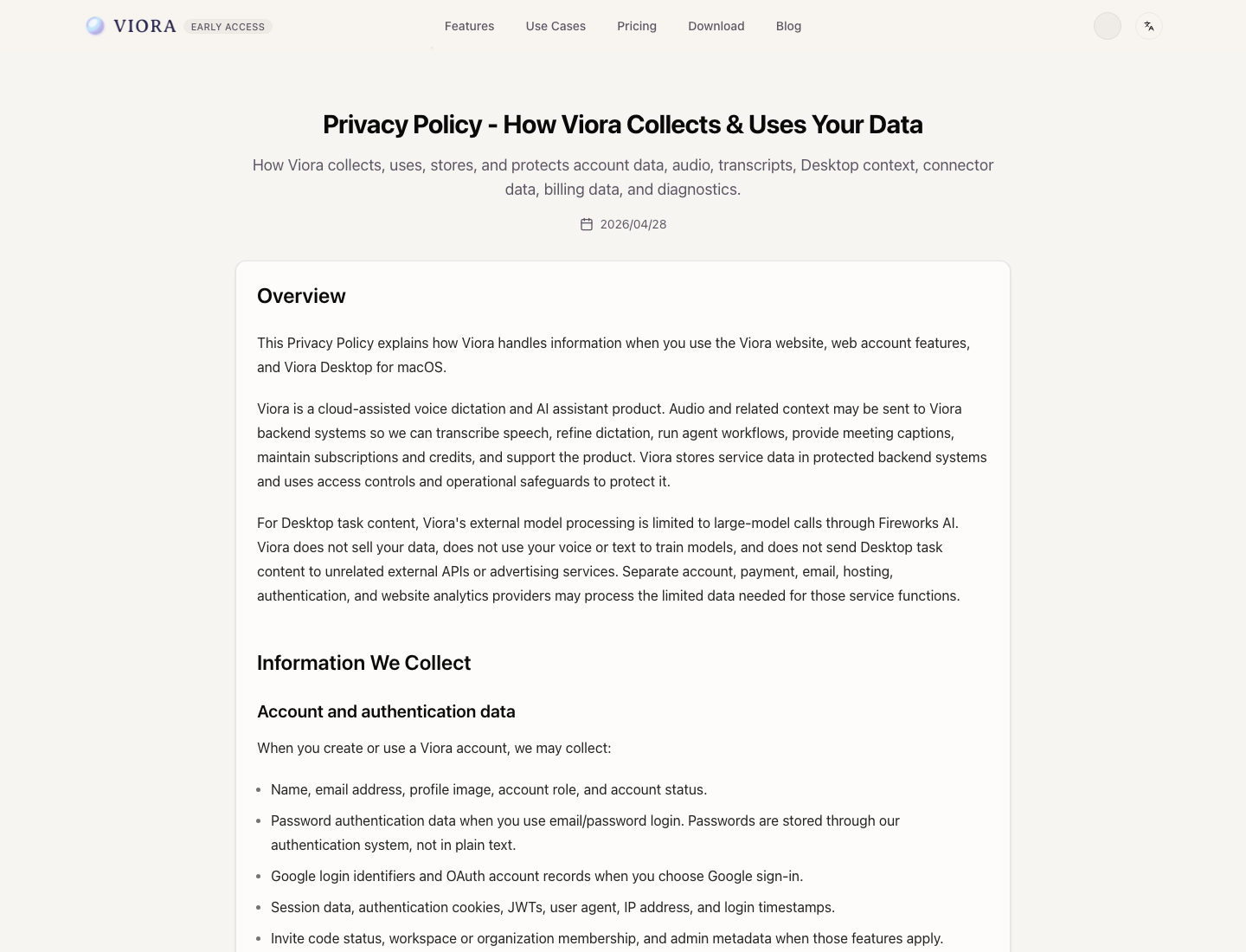
The Viora Privacy Policy is the official reference for cloud-assisted processing, model-provider, model-training, and Privacy Mode language.
Definition Block
Cloud-assisted dictation means some app behavior can happen locally on your Mac, but transcription or model steps may use managed backend systems. Offline dictation means the core speech-to-text path works without sending audio away from the device.
This distinction matters because Viora is not trying to be a local-only speech engine. Viora's category is better understood through What is Viora?: a macOS voice AI assistant that uses speech for writing, editing, context questions, and supported task routing.
What Viora Can Do Locally
Some Viora behavior happens on your Mac or under your Mac user profile. Based on Viora's current Privacy Policy, that can include:
| Local area | What it means |
|---|---|
| Desktop app permissions | Viora Desktop may request macOS microphone, accessibility, screen recording, notifications, and launch-at-login permissions for features you choose. |
| Local settings | Language, shortcut preferences, selected microphone, Privacy Mode, launch-at-login, and UI preferences can be stored locally. |
| Local history and records | Viora Desktop may store dictation and agent history, recording file paths, transcripts, task IDs, and agent event history on your Mac. |
| Local recordings | Desktop recordings may be saved locally unless Privacy Mode or a specific feature flow skips that persistence. |
| Local custom skills | Local custom skills and optional skill files you create or install may remain on your Mac. |
Local storage does not mean the product is offline. Local files and settings can coexist with backend processing.
What Can Use Cloud Processing
Viora's privacy and terms describe the product as cloud-assisted. The relevant boundary is straightforward:
| Feature area | Cloud-assisted boundary |
|---|---|
| Dictation | Microphone audio, task metadata, transcripts, and refined text may be sent to Viora backend systems so speech can be transcribed and cleaned up. |
| Agent mode | Audio, text, prompts, selected text, active-window context, and task metadata may be processed through backend systems to answer or act on the request. |
| Text-input agent tasks | If you type or edit an agent prompt instead of recording audio, the text input and limited task metadata may still be sent to the backend. |
| Meeting mode | Microphone audio, system audio when permission is granted, meeting segments, captions, notes, and related metadata may use backend processing. |
| Model processing | For Desktop task content, Viora currently says external model processing is limited to large-model calls through Fireworks AI. |
| Website and account services | Account, authentication, billing, email, hosting, analytics, and support functions may use separate service providers as needed for those service functions. |
That is why Viora should be described as cloud-assisted, not cloud-free. For the broader category comparison, read Voice AI assistant vs dictation software. That guide explains the broader difference between simple speech-to-text tools and cloud-assisted voice AI workflows.
What Privacy Mode Changes
Privacy Mode is designed to reduce persistence for supported new tasks. Current Viora policy says Privacy Mode can:
- Skip local recording or transcript record persistence for supported dictation and agent flows.
- Send a
privacy_modeflag to the backend. - Keep temporary context in memory during an active private session so the assistant can respond coherently.
The important limit is just as clear: Privacy Mode does not make transcription fully local. Audio, text, and the limited context needed to complete the request may still be sent to Viora backend systems and, when needed for the model step, to Fireworks AI.
Use Privacy Mode when you want lower persistence for supported new tasks. Do not treat it as an offline-processing guarantee.
What Viora Says About Model Training
Viora's current privacy and terms say it does not use user content to train models. In policy language, this includes voice, transcripts, prompts, files, connector data, feedback, text, and User Content.
That statement should not be stretched into claims Viora does not make. It does not mean Viora is offline. It does not mean no data is processed by backend systems. It does not mean the product has published HIPAA, SOC 2, ISO 27001, or GDPR compliance claims. It means the current Viora policy says user content is not used for model training.
Who Viora Is For
Viora is a good fit when the workflow benefits from speech plus AI assistance, and the user accepts a cloud-assisted model.
| Good fit | Why Viora can make sense |
|---|---|
| Mac users who want more than short speech-to-text | Viora is built around writing, editing, asking, and supported small tasks from voice. |
| Writers, founders, PMs, developers, and support teams | These workflows often need cleanup, rewriting, context, and structured output rather than raw transcripts. |
| People who work across Mac apps | Viora is designed around the current app, selected text, nearby context, and supported connectors. |
| Users who want clear privacy boundaries | The product can be evaluated with explicit limits: cloud-assisted, not fully offline, no local-only claim. |
If this matches your needs, start with download Viora for Mac. For plan details, use Viora pricing rather than older screenshots, summaries, or third-party references.
Who Viora Is Not For
Viora is not the right choice when one of these requirements is non-negotiable:
| Hard requirement | Why Viora may not fit today |
|---|---|
| Offline-only transcription | Viora is cloud-assisted. |
| Local-only or on-device-only processing | Viora may send audio, text, and task context to backend systems and Fireworks AI when needed. |
| "No audio ever leaves my Mac" | Viora's current privacy boundary does not support that promise. |
| Local Whisper model selection | Viora does not list local Whisper model support today. |
| Bring-your-own LLM keys | Viora does not list BYO LLM key support today. |
| HIPAA-required workflows | Viora does not publish a HIPAA compliance claim today. |
| SOC 2 or ISO 27001 procurement requirements | Viora does not publish those certification claims today. |
| Windows, iOS, or Android support | Viora publicly ships for macOS today. |
| Team billing or enterprise admin controls | Current public pricing copy is built around Free and Pro individual use, not enterprise controls. |
If offline transcription matters more than agent workflows, compare Viora vs Superwhisper, because that page covers the local/offline decision more directly.
What Viora Cannot Promise
This page should not be read as a broad privacy, security, or compliance promise. Based on current public sources, Viora cannot promise:
- Fully offline processing.
- Local-only transcription.
- On-device-only AI processing.
- That no audio ever leaves your Mac.
- HIPAA compliance or HIPAA readiness.
- SOC 2, ISO 27001, or GDPR compliance status.
- Enterprise controls, team admin controls, or team billing.
- Unlimited usage.
- Local Whisper model support.
- Bring-your-own LLM API key support.
- Windows, iOS, or Android apps.
- That AI output is always accurate or suitable for high-impact decisions.
For legal, medical, financial, employment, safety, regulated, or highly confidential workflows, verify current policy, contract, consent, retention, and compliance requirements before using any voice AI tool.
Practical Evaluation Checklist
Before you use Viora with sensitive work, answer these questions:
- Can this task use cloud-assisted processing?
- Would selected text, active-window context, audio, or transcripts be sensitive under your company policy?
- Do you need offline-only transcription, or is reduced persistence enough?
- Do you need a compliance document, DPA, BAA, security certification, or enterprise admin controls?
- Are you comfortable reviewing AI output before relying on it?
- Is a Mac-only app acceptable for your workflow?
If the answer to the first, fifth, and sixth questions is yes, Viora can be a reasonable product to test. If the second, third, or fourth question creates a hard blocker, choose a local-first or contract-backed tool instead.
Related Viora Pages
- What is Viora? for the main product overview and fit.
- Voice AI assistant vs dictation software for the current cloud-assisted vs offline dictation category comparison.
- Voice Dictation for macOS for the dictation workflow.
- Viora Privacy Policy for current privacy language.
- Viora Terms of Service for user-content, AI-output, and cloud-assisted terms.
- Download Viora for Mac to try the Mac app.
- Viora pricing to check current plan details.
FAQ
Is Viora fully offline?
No. Viora is cloud-assisted, not fully offline or local-only. Audio, text, and task context may be sent to Viora backend systems and, when needed for model processing, Fireworks AI.
Does Privacy Mode make Viora local-only?
No. Privacy Mode is designed to reduce persistence for supported new tasks, but it does not make transcription fully local. Cloud processing can still be used to complete the request.
What data can leave my Mac when I use Viora?
Depending on the feature, Viora may send microphone audio, transcripts, refined text, prompts, selected text, active-window context, task metadata, connector availability metadata, and meeting audio segments to backend systems.
Does Viora use my voice or text to train models?
Viora says it does not use voice, transcripts, prompts, files, connector data, feedback, text, or User Content to train models.
Who is Viora a good fit for?
Viora is a good fit for Mac users who want voice to help write, edit, ask about context, and run supported small tasks, and who are comfortable with a cloud-assisted processing model.
Who should not use Viora?
Do not choose Viora if your hard requirement is offline-only transcription, local-only processing, local Whisper models, bring-your-own LLM keys, Windows or mobile support, or a published HIPAA/SOC 2 compliance posture today.