
Voice Agent for Mac: Write, Edit, and Search
A voice assistant for Mac that can write in the current app, edit selected text, search the web, and run supported agent tasks.
By the Viora team - Last updated August 12, 2026.
Viora Voice Agent is a voice assistant for Mac that can write, edit, and search from the app where you are already working. Hold the shortcut, say what you want, and Viora can write into the focused Mac app, clean up natural speech, rewrite selected text, or run supported tasks such as web search, calendar lookup, and connector workflows.
It is for Mac users who want voice to move work forward, not only replace the keyboard. Viora is cloud-assisted, not fully offline. Viora is macOS-only today.
What is Viora Voice Agent?
Viora Voice Agent is Viora's voice-powered workflow layer for macOS. You speak a request. Viora decides whether that request should become text, an edit, an answer, or a small supported action.
The simple difference is this: normal dictation turns speech into text. Viora Voice Agent turns speech into a Mac workflow.
What it can do
Viora Voice Agent is built around four everyday jobs:
- Write. Speak into the current app or text field and get cleaned-up text.
- Edit. Select text, say how it should change, and review the rewritten result.
- Ask. Ask a question about selected or nearby context without copy-paste.
- Do. Send a spoken request into a supported agent workflow, such as search, calendar lookup, or a connector task.
This does not mean Viora runs your computer without review. It means your voice can start the next useful step.
For tasks that use an external service, first connect the app to Viora. The guide covers authorization, connection status, and what to check if the app does not connect.
A Mac voice assistant that can write, edit, and search
"Write, edit, and search" describes three different results, not three names for dictation. These examples show the input, the visible result, and where to review it.
| Intent | What you can say | What Viora does | Where the result appears |
|---|---|---|---|
| Write | "Email Maya that the launch moved to Thursday and ask whether noon still works." | Turns the spoken message into a draft and inserts it at the cursor. With Dictation refinement enabled, Viora also improves formatting and fluency. | The focused text field in Mail, Gmail, Slack, Notes, a browser form, or another editable Mac app |
| Edit | Select a paragraph, then say, "Make this concise and professional, but keep the Thursday deadline." | Rewrites the selected text while preserving the requested fact. If the edit misses the intent, use Cmd+Z and try a narrower instruction. | In place of the selected text in the current app |
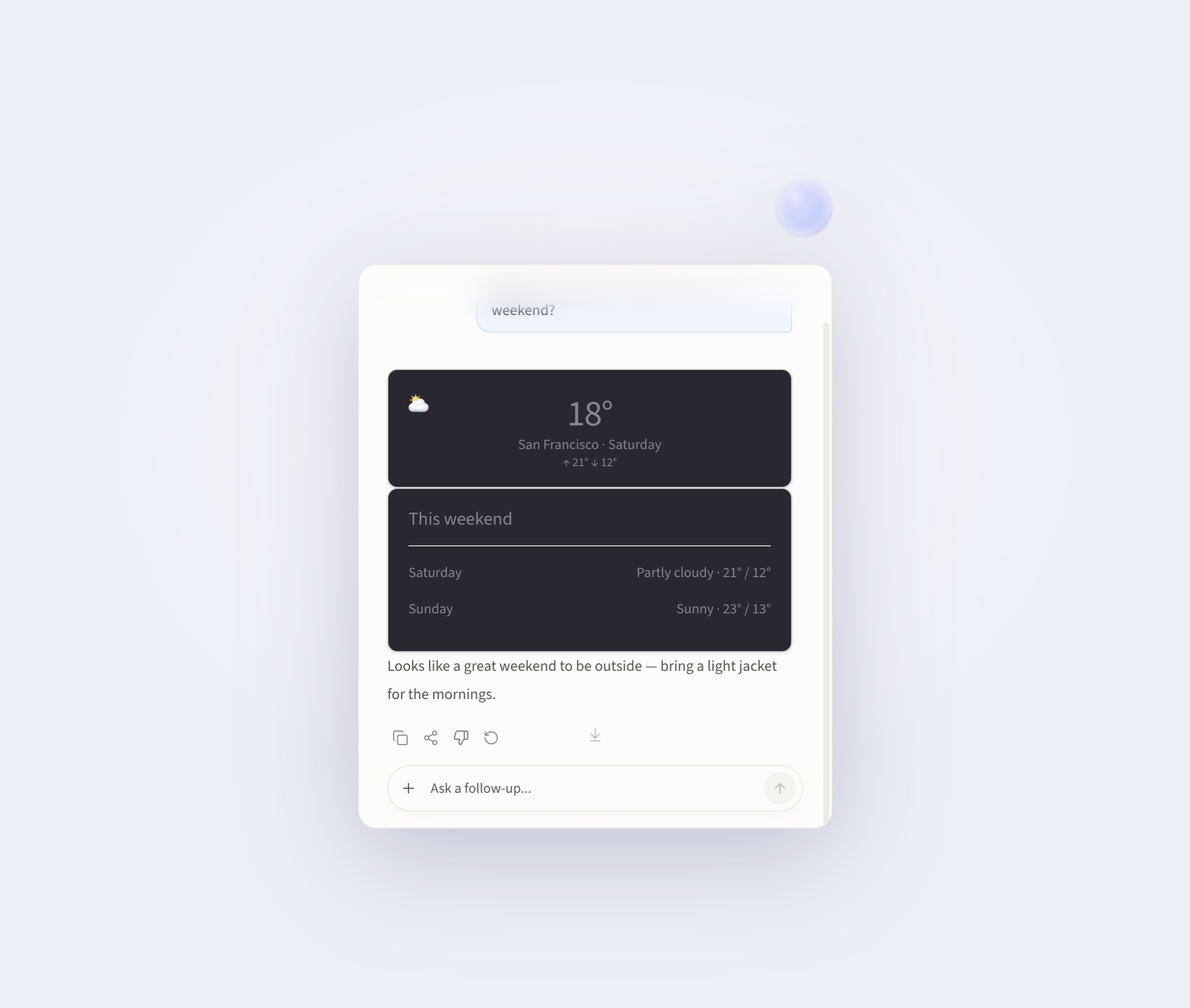
| Search | "Search the web for the latest macOS Dictation requirements and show me the sources." | Starts a supported web-search workflow and returns an answer with source links for review. | Viora's Agent Card beside the current workflow |
The boundaries matter. Writing and editing change text in an editable field. Search returns research in the Agent Card; it does not silently paste an unreviewed answer into your document. App focus, macOS permissions, network access, and the selected workflow can affect the result.
How it works
- Hold the shortcut. Public Viora pages list
FnorCtrl+Fas default hotkeys, and both can be customized. - Speak naturally. You can say a sentence, a rewrite request, a question, or a small task.
- Release. Viora routes the request to the right workflow.
- Review the result. The output may be inserted text, rewritten text, a contextual answer, or an Agent Card result.
Use the Dictation and Agent shortcut settings to check or customize the keys for each mode.
Four core workflows
| Workflow | What you say | What Viora does | Good for |
|---|---|---|---|
| Write | "Draft a short reply" | Cleans up speech and inserts text into the current app | Email, chat, docs, forms |
| Edit | "Make this shorter" | Rewrites selected text | Customer replies, PRDs, handoffs |
| Ask | "What does this mean?" | Answers about selected or nearby context | Reading docs, checking details, understanding notes |
| Do | "Check my calendar" | Opens an Agent Card and runs a supported small task | Search, calendar lookup, connector workflows |
Viora vs Siri for writing, editing, and search
Siri is the built-in Apple assistant, and Apple documents broad system strengths: Siri can get information from the web and complete actions in supported apps. Apple Intelligence Writing Tools can also proofread or rewrite selected text in many Mac apps. Viora's difference is the workflow surface, not a claim that Siri cannot write, edit, or search.
| Job | Siri and Apple Writing Tools | Viora Voice Agent |
|---|---|---|
| Write | Siri works with Apple communication apps, while Writing Tools can compose with the ChatGPT extension on supported Macs. | Hold one configurable shortcut and speak a draft into the text field that already has focus. |
| Edit | Select text, open Writing Tools, then choose or describe a rewrite. Availability depends on Mac model, language, region, and Apple Intelligence settings. | Select text, hold the Viora shortcut, and speak the exact change; the edited result replaces the selection and can usually be undone with Cmd+Z. |
| Search | Siri can return web information and is tightly integrated with Apple apps, devices, and personal context. | Ask for a supported web search and review the answer and sources in the Agent Card beside the app where you are working. |
| Best reason to choose it | Built-in system integration and Apple ecosystem reach | A consistent hold-to-talk path across writing, selected-text editing, contextual questions, web search, and supported connector tasks on macOS |
Choose Siri when built-in Apple integration is the priority. Evaluate Viora when the repeated job is moving from a focused text field to a spoken edit or an Agent Card search without opening a separate chat. Viora is a third-party, cloud-assisted Mac app; Siri availability and Apple Intelligence features vary by device, language, and region.
Voice Agent vs normal dictation
| Area | Normal dictation | Viora Voice Agent |
|---|---|---|
| Main job | Turn speech into text | Turn speech into writing, edits, answers, or small tasks |
| Output | Raw or cleaned text | Text, rewritten text, contextual answers, or Agent Card results |
| Context | Usually the current transcript | Selected text, nearby context, personal terms, memory-like guidance, or connectors when supported |
| Best for | Short messages, notes, simple input | Email, PRDs, code review notes, support replies, team updates |
| Platform | Depends on the tool | macOS-only today |
| Offline use | Some tools can be offline | Cloud-assisted, not fully offline |
If your work ends once words appear on screen, a normal dictation tool may be enough. If your work continues into rewriting, context, search, calendar checks, or connector tasks, a voice agent is the better category to evaluate.
Who it is for
Viora Voice Agent is useful for Mac knowledge work where typing is only one part of the job.
| User | What they can do with Viora Voice Agent |
|---|---|
| Developers and AI builders | Speak prompts, code review notes, technical context, and documentation drafts |
| Creators | Turn spoken ideas into hooks, scripts, captions, summaries, and replies |
| Founders and PMs | Shape product thoughts into PRDs, risks, updates, and meeting follow-ups |
| Support and success teams | Draft customer replies, reuse repeated answers, and keep help docs current |
| Office writers | Write email, clean up handoffs, translate notes, and rewrite selected text |

Privacy, platform, and limits
Viora should be described clearly: it is cloud-assisted. It is not fully offline or local-only. When large-model processing is needed, desktop task content may be processed through Viora backend systems.
Viora says it does not sell user data and does not use voice, text, or User Content to train models. Viora also offers Privacy Mode for supported new tasks, but Privacy Mode does not make transcription fully local.
Current limits to know:
- Viora is macOS-only today.
- Apple Silicon and Intel Mac downloads are listed publicly.
- Viora does not offer a public API today.
- Viora does not support bring-your-own LLM API keys today.
- Viora does not support local Whisper models today.
- Viora does not claim HIPAA compliance today.
Before you try it
Ask yourself six questions:
- Do you work mostly on a Mac?
- Do you want to reduce typing and app switching?
- Do you often rewrite selected text?
- Do you ask questions about the content in front of you?
- Can your workflow accept cloud-assisted processing?
- Do you require offline-only, Windows, iOS, Android, a public API, BYO LLM keys, or HIPAA workflows?
If the first four answers are yes, Viora Voice Agent is worth trying. If offline-only processing or non-Mac support is non-negotiable, Viora is not the right fit today.
FAQ
Is Viora Voice Agent a separate product?
No. Viora Voice Agent is a feature framing for Viora's voice-led workflows. It describes how Viora uses speech for writing, editing, asking about context, and supported small agent tasks on macOS.
How is it different from dictation?
Dictation mainly turns speech into text. Viora Voice Agent also handles selected-text edits, contextual questions, and supported agent workflows. Dictation is one part of the experience, not the whole product.
Can Viora write, edit, and search by voice on a Mac?
Yes. Viora can insert spoken writing into the focused Mac app, rewrite selected text from a spoken instruction, and run a supported web search in its Agent Card. Review generated text and search results before using them.
Can I use it in any Mac app?
Viora is designed to work where you already type on your Mac, including text fields in apps and browser inputs. Specific behavior can depend on app permissions, current focus, and the workflow you ask Viora to run.
Is it fully offline?
No. Viora is cloud-assisted. It should not be described as fully offline, local-only, or on-device only.
Does Viora use my voice or text to train models?
Viora's public privacy materials say it does not use voice, text, or User Content to train models.
Does Viora support Windows, iOS, or Android?
No. Viora is macOS-only today. Public materials list Apple Silicon and Intel Mac downloads.
Related reading
- Ask in Place - ask questions about selected or nearby context.
- Selected-Text Editing - rewrite existing text by voice.
- Memory - reuse controlled preferences, terms, and workflow guidance.
- Voice Dictation for macOS — how Viora turns natural speech into polished text.
- Mac dictation: the complete guide — built-in macOS dictation, third-party tools, and Viora compared.
- Voice AI assistant vs dictation software — why a voice AI assistant is a different category.
- Use cases for Viora — examples for developers, creators, PMs, support teams, and office writers.
- Privacy Policy — how Viora describes cloud-assisted processing and Privacy Mode.
- Download Viora — install the Mac app.
Keep exploring Viora features
Each feature page focuses on one workflow. Move across the set to understand how writing, editing, asking, agent work, and memory connect.
Plan the next step
Use these pages when you need examples, plan boundaries, or the broader resource hub before deciding how to use Viora.